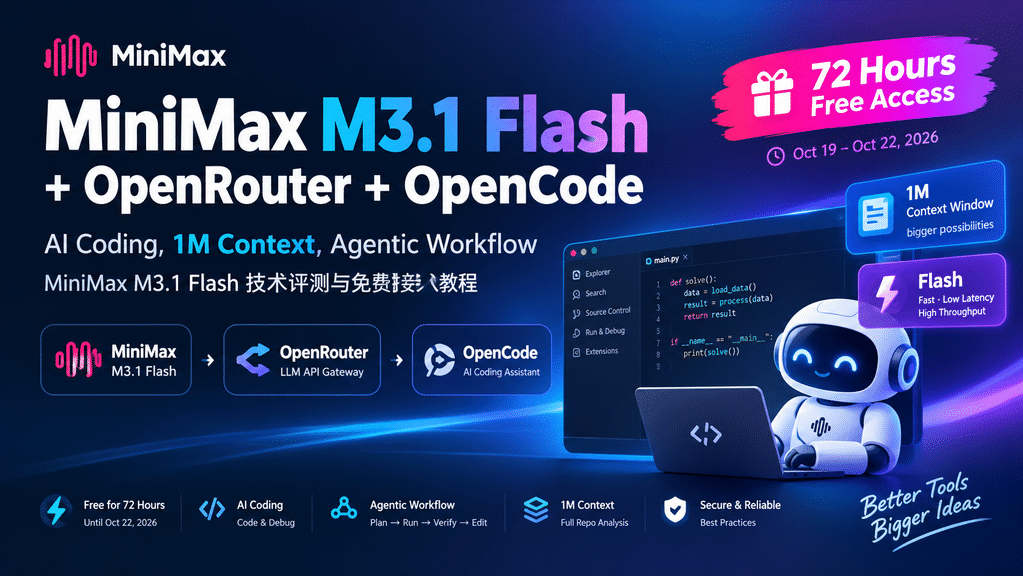
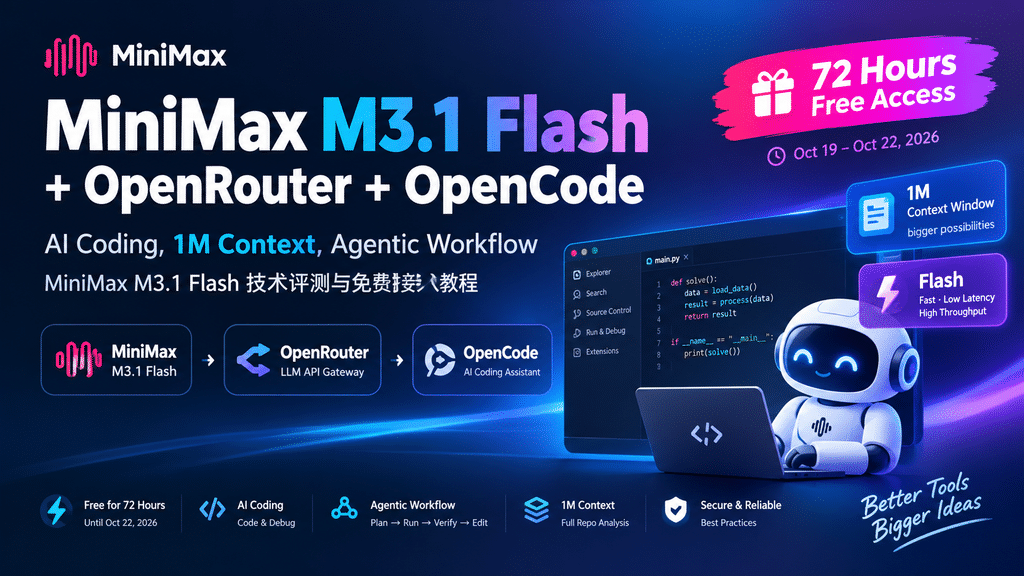
MiniMax M3.1 Flash is attracting attention from developers interested in AI coding, large language models, and automated development workflows. With its advertised 1M-token context window and Flash-oriented inference, the model is worth exploring for code generation, debugging, script automation, and repository analysis.
MiniMax M3.1 Flash 最近受到不少 AI 开发者的关注。对于正在寻找 AI 编程工具、大语言模型和自动化开发工作流的技术人员来说,这款模型值得了解。根据相关介绍,它主打百万 Token 上下文窗口和 Flash 高速推理定位,可用于代码生成、错误排查、脚本自动化以及代码仓库分析。
1. What Is MiniMax M3.1 Flash?
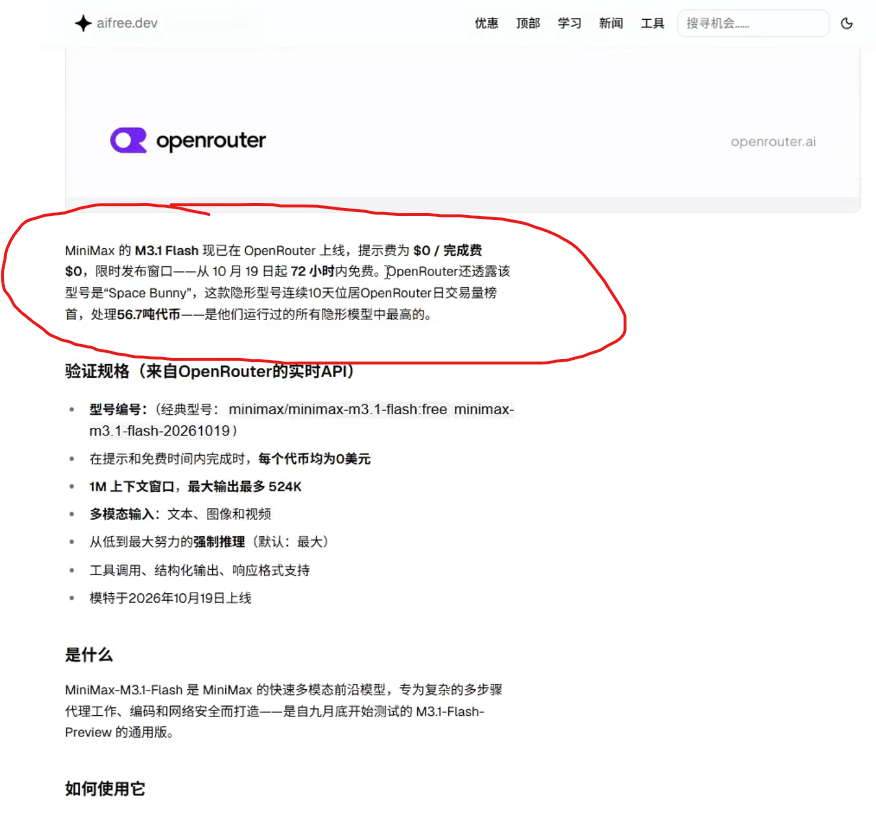
MiniMax M3.1 Flash is an AI model designed for developers who need responsive inference and practical coding assistance. According to the original announcement, an anonymous model on OpenRouter reportedly processed approximately 5.6 billion tokens over ten days before being identified as MiniMax M3.1 Flash.
MiniMax M3.1 Flash 是一款面向开发者的 AI 模型,重点关注响应速度和实际编程辅助能力。根据原始介绍,此前 OpenRouter 上有一个匿名模型,据称在十天内处理了约 56 亿 Token,随后被揭晓为 MiniMax M3.1 Flash。以上使用量属于原始材料提供的信息,并非独立验证的统计结果。
A 1M Context Window for Large Projects
One of the most notable advertised features is its 1-million-token context window. A large context window can help an AI coding assistant process extensive documentation, multiple source files, configuration files, and project dependencies within a single task.
最值得关注的特点之一,是其据称支持高达 100 万 Token 的上下文窗口。较大的上下文容量可以帮助 AI 编程助手在同一任务中处理大量技术文档、多个源代码文件、配置文件以及项目依赖信息。
However, a large context window does not automatically guarantee better answers. Actual performance depends on the model’s ability to retrieve relevant information, follow instructions, and reason across long inputs. The context available to users may also depend on the provider’s configuration.
不过,上下文窗口越大,并不意味着回答质量一定越高。实际效果仍取决于模型检索关键信息、遵循指令以及处理长文本关联关系的能力。此外,用户实际能够使用的上下文长度,也可能受到服务平台配置的影响。
Flash Inference for Faster Coding Workflows
The Flash positioning focuses on fast inference and low-latency interactions. This can be useful when developers repeatedly ask an AI assistant to edit code, explain errors, generate small scripts, or perform multiple steps in an automated workflow.
Flash 定位强调快速推理和低延迟交互。这对于需要反复修改代码、解释错误信息、生成小型脚本,或者执行多个自动化步骤的开发者来说,具有一定吸引力。
For developers who frequently use AI coding assistants, the practical question is not simply how fast a model responds. Code quality, tool compatibility, rate limits, and the ability to complete a task successfully are equally important.
对于经常使用 AI 编程助手的开发者来说,模型的响应速度并不是唯一的衡量标准。代码质量、工具兼容性、调用频率限制以及任务最终能否成功完成,同样重要。
2. Is MiniMax M3.1 Flash Free on OpenRouter?
According to the original announcement, MiniMax M3.1 Flash was offered free of model usage charges on OpenRouter for a limited 72-hour period beginning October 19, 2026. The expected end date under that schedule was approximately October 22, 2026.
根据原始活动介绍,MiniMax M3.1 Flash 自 2026 年 10 月 19 日起在 OpenRouter 开启了为期 72 小时的限时免费活动。按照这一时间安排,活动预计在 2026 年 10 月 22 日前后结束。
Because promotional pricing can change, developers should check the model’s current listing before using it. Do not assume that a previously free model remains free after the promotion ends.
由于模型促销价格可能发生变化,开发者在使用之前应先检查模型的最新页面。不要因为模型曾经免费,就默认活动结束后仍然可以免费调用。
You can visit the official platform here:
- OpenRouter: https://openrouter.ai/
- OpenCode: https://opencode.ai/zh/download
官方平台入口如下:
- OpenRouter:用于查找模型、查看定价和管理 API 密钥。
- OpenCode:用于下载 AI 编程工具并配置模型服务商。
3. How to Use MiniMax M3.1 Flash with OpenRouter and OpenCode
OpenRouter provides a unified API gateway for supported AI models, while OpenCode offers an interface for AI-assisted software development. Combining the two allows developers to connect a supported model to a coding environment and experiment with practical programming tasks.
OpenRouter 为受支持的 AI 模型提供统一的 API 接入方式,而 OpenCode 则提供 AI 辅助软件开发环境。将两者结合起来,开发者便可以把支持的模型接入编程工具,并尝试实际的代码开发任务。
Step 1: Create an OpenRouter Account
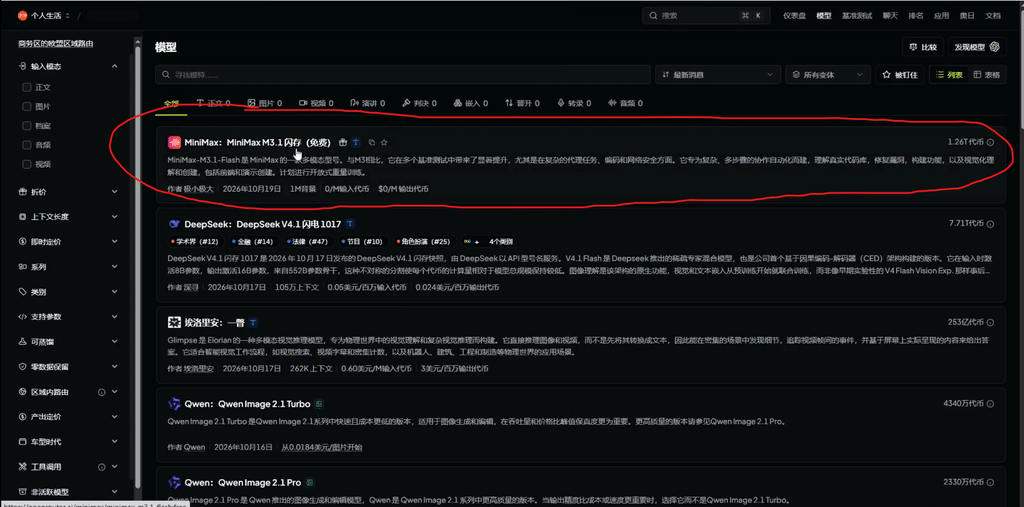
Visit the official OpenRouter website and register an account. Once logged in, open the model directory and search for MiniMax M3.1 Flash. Check its availability and pricing before continuing.
首先,访问 OpenRouter 官方网站并注册账号。登录后打开模型目录,搜索 MiniMax M3.1 Flash,并在继续操作之前确认模型的可用状态和当前价格。
Step 2: Create an API Key
Open your OpenRouter dashboard and navigate to the API Keys section. Create a new key and give it a recognizable name. Configure the available usage limits and expiration settings according to your needs, then copy the key securely.
进入 OpenRouter 仪表盘,找到 API Keys(API 密钥)页面。创建一个新密钥,并设置便于识别的名称。根据实际需求配置可用的调用额度和有效期,然后安全地复制并保存密钥。
Security tip: Never publish your API key in a public GitHub repository, WordPress article, screenshot, or frontend JavaScript. If a key is exposed, revoke it immediately and generate a replacement.
**安全提示:**不要将 API 密钥发布到公开的 GitHub 仓库、WordPress 文章、截图或前端 JavaScript 代码中。如果密钥发生泄露,应立即撤销并重新生成。
Step 3: Download and Configure OpenCode
Visit the official OpenCode download page and install the application for your operating system. Open the application and locate the provider configuration settings. Select OpenRouter if it is available in your version, then follow the prompts to connect your API key.
访问 OpenCode 官方下载页面,根据自己的操作系统下载并安装应用。打开软件后,找到服务商配置选项。如果当前版本支持 OpenRouter,就选择该服务商,并按照界面提示配置 API 密钥。
The exact menu names may vary between versions. If the interface differs from a tutorial screenshot, refer to the latest official documentation.
不同版本的软件可能使用不同的菜单名称。如果实际界面与教程截图存在差异,建议以最新官方文档为准。
Step 4: Select MiniMax M3.1 Flash
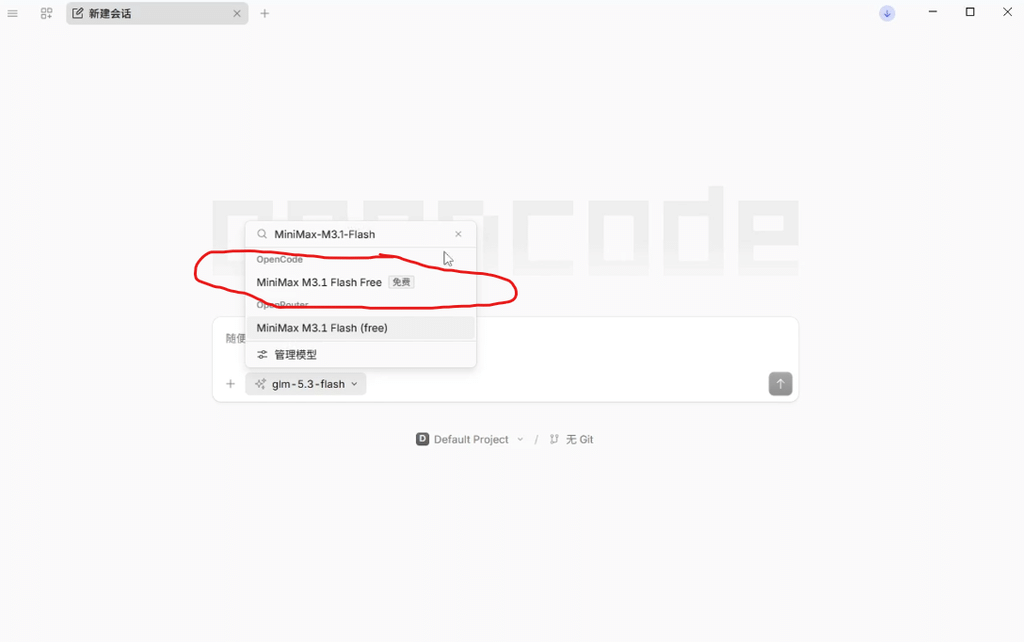
Create a new conversation and open the model selector. Search for the exact model identifier shown on OpenRouter and select it if it is available to your account.
新建一个对话并打开模型选择器。搜索 OpenRouter 页面显示的准确模型标识,在确认账号能够使用后选择该模型。
Start with a small task, such as explaining a function, generating a simple Python script, or writing a unit test. Once the connection works correctly, move on to more complex coding tasks.
建议先从简单任务开始,例如解释一个函数、生成一个 Python 小脚本,或者编写单元测试。确认模型连接和调用正常之后,再尝试更复杂的编程任务。
4. Hands-On Experience: The Value of an AI Coding Agent
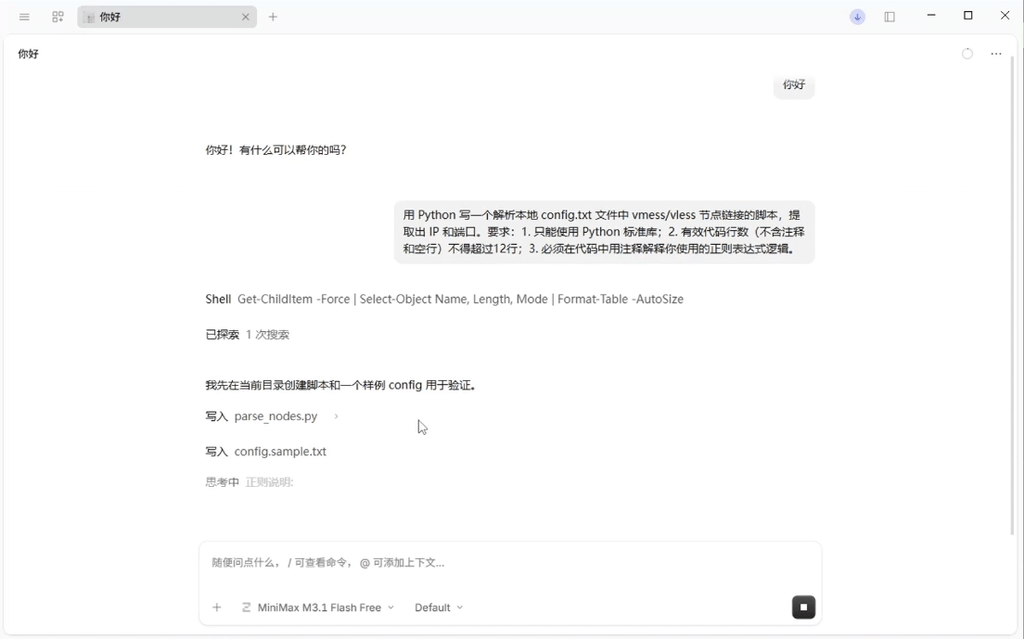
One interesting aspect of the supplied test was the model’s reported ability to follow a multi-step coding workflow rather than simply returning a code snippet.
在提供的实测记录中,一个值得关注的地方是:模型据称能够执行多步骤编程工作流,而不只是直接返回一段代码。
According to the test description, the model created a temporary test file, executed the code, used a PowerShell command to count relevant output lines, identified a line-count issue caused by documentation comments, and edited the code again to satisfy the specified limit.
根据实测描述,模型先创建了临时测试文件并执行代码,随后使用 PowerShell 命令统计相关输出行数。发现文档注释导致行数超出限制后,它再次编辑代码,使结果符合指定要求。
This illustrates the potential of an AI coding agent. Instead of stopping after code generation, an agent can interact with development tools, inspect execution results, and attempt to correct mistakes.
这体现了 AI 编程 Agent 的潜在价值。与生成代码后就停止的传统交互方式不同,Agent 可以调用开发工具、检查执行结果,并尝试修正错误。
A typical agentic workflow may look like this:
- Understand the task and define the requirements.
- Generate or modify the code.
- Execute commands or tests.
- Inspect the output and identify problems.
- Make corrections and run validation again.
典型的 Agent 工作流通常包括以下步骤:
- 理解任务并明确需求。
- 生成或修改代码。
- 执行命令或运行测试。
- 检查输出并发现问题。
- 修正代码并重新验证。
This approach can be particularly useful for unit testing, repetitive code changes, script generation, and debugging tasks with clear acceptance criteria.
这种方式尤其适用于单元测试、重复性代码修改、脚本生成,以及具有明确验收标准的错误排查任务。
However, self-checking does not guarantee correctness. An AI agent may run the wrong command, misunderstand the output, or introduce new bugs during editing. Developers should review the changes and run their own tests before accepting the result.
不过,自我检查并不意味着结果一定正确。AI Agent 可能执行错误的命令、误解输出信息,或者在修改代码时引入新问题。因此,开发者仍应审查修改内容,并在接受结果之前自行运行测试。
5. Best Use Cases for MiniMax M3.1 Flash
AI Coding and Debugging
Use an AI coding assistant to explain unfamiliar code, generate boilerplate, identify likely causes of errors, and suggest possible fixes. Always verify the proposed changes against the actual application behavior.
可以利用 AI 编程助手解释陌生代码、生成基础代码结构、分析错误的可能原因,并提出修复建议。但所有修改都应结合实际程序运行情况进行验证。
Repository-Level Analysis
A large context window may help the model analyze relationships between modules, documentation, configuration files, and dependencies. For complex repositories, provide clear questions and ask the model to identify the relevant files and functions.
较大的上下文窗口有助于模型分析模块、文档、配置文件和依赖之间的关系。对于复杂代码仓库,应提出明确的问题,并要求模型指出相关文件和函数,方便进一步核查。
Script Automation
Developers can use AI models to draft shell scripts, automate repetitive file operations, transform structured data, and create small utilities. Test scripts on sample data before running them against important files.
开发者可以使用 AI 模型编写 Shell 脚本、自动化重复的文件操作、转换结构化数据,以及创建小型工具。在对重要文件执行脚本之前,务必先使用样本数据测试。
Test-Driven Development
One practical workflow is to define the expected behavior first, ask the model to implement a change, run automated tests, and use the test results to guide subsequent corrections.
一种实用的开发方式是先定义预期行为,再让模型实现修改、运行自动化测试,并根据测试结果指导后续修正。
6. Limitations and Security Considerations
Before using MiniMax M3.1 Flash in a production environment, evaluate its coding accuracy, latency, context handling, rate limits, and total cost under your own workload. Results from one coding task do not necessarily predict performance across every programming language or project type.
在生产环境中使用 MiniMax M3.1 Flash 之前,应根据自己的实际工作负载评估代码准确性、响应延迟、上下文处理能力、调用频率限制和总体成本。单个编程任务的测试结果,并不能代表模型在所有编程语言和项目类型中的表现。
Avoid giving an AI coding agent unrestricted access to production credentials, confidential files, or destructive system commands. Use appropriate permissions, isolated development environments, backups, and human approval for risky actions.
不要让 AI 编程 Agent 无限制地访问生产环境凭据、机密文件或具有破坏性的系统命令。建议使用合理的权限配置、隔离的开发环境和备份机制,并对高风险操作保留人工确认步骤。
If you are working with proprietary code, review the provider’s privacy policy, data handling practices, and applicable usage terms before submitting sensitive information.
如果你处理的是专有源代码,应在提交敏感信息之前阅读服务商的隐私政策、数据处理规则和相关使用条款。
7. Final Verdict
MiniMax M3.1 Flash is worth testing for developers interested in AI coding, large-context language models, and agentic development workflows. Its practical value should be judged by the quality of its output, its ability to use tools correctly, and how reliably it completes real tasks.
对于关注 AI 编程、大上下文语言模型和 Agent 开发工作流的开发者来说,MiniMax M3.1 Flash 值得进行实际测试。评估它的价值时,应重点关注输出质量、工具调用是否正确,以及能否稳定完成真实任务。
The combination of OpenRouter and OpenCode offers a convenient starting point for experimenting with supported AI models. Begin with small, measurable tasks, verify the current model pricing, and gradually expand your testing workflow.
OpenRouter 与 OpenCode 的组合,为尝试受支持的 AI 模型提供了一个方便的起点。建议从规模较小、结果容易衡量的任务开始,确认模型的最新价格,再逐步扩大测试范围。
Ultimately, the most useful AI coding tool is not necessarily the one that generates code fastest. It is the one that helps you produce maintainable, testable, and secure software with less repetitive work.
归根结底,最有价值的 AI 编程工具不一定是生成代码最快的工具,而是能够帮助开发者减少重复劳动,同时产出易维护、可测试且安全的软件的工具。