A practical guide to keeping a website reachable, trusted, and fast—without starting with an expensive monitoring stack.
这是一份注重实操的指南,帮助你在不必一开始就购买昂贵监控系统的情况下,让网站保持可访问、可信赖且加载迅速。
Updated October 28, 2026 · 10–12 minute read · Includes setup steps, comparison criteria, and clearly labeled illustrative dataQuick answer. Use an uptime monitor to detect availability failures, a dedicated TLS/SSL test to inspect certificate and protocol configuration, and a performance tool to diagnose slow pages. These tools measure different things; no single green status badge proves that a website is healthy end to end.
先说结论。使用运行状态监控发现网站不可访问的问题,使用专门的 TLS/SSL 测试检查证书和协议配置,再用性能工具诊断页面变慢的原因。这些工具衡量的是不同指标;单个绿色状态标识并不能证明整站从头到尾都健康。In this guide / 本文目录Real-world case study: hachke.bond / 实测案例
- Why monitoring matters / 为什么需要监控
- Hachke.bond case study / Hachke.bond 实例分析
- Free tools compared / 免费工具对比
- Hands-on setup / 实操配置
- How to run a fair performance test / 如何进行公平的性能测试
- Original analysis and decision guide / 原创分析与选型建议
- FAQ / 常见问题
1. Why Website Monitoring Matters in 2026 / 为什么 2026 年网站监控依然重要
A website can fail in several different ways: the server may stop responding, a DNS change may send visitors to the wrong place, a TLS certificate may expire, or a new plugin may make the checkout page painfully slow. Visitors often experience these as one problem—“the site is broken”—but each needs a different diagnostic path.
网站可能以多种方式出问题:服务器停止响应、DNS 修改把访客导向错误位置、TLS 证书过期,或者新插件让结账页面变得极慢。访客通常只会把这些情况统称为“网站坏了”,但每一种问题都需要不同的诊断方法。
Monitoring helps you notice incidents before a customer reports them. It also creates a baseline: if response times steadily rise after a deployment, you can compare the new measurements with previous results instead of guessing. For SEO, monitoring is an operational safeguard—not a direct ranking shortcut. Availability, security, and user experience matter, but installing a monitoring service does not itself improve rankings.
监控能帮助你在客户投诉之前发现故障,也能建立性能基线:如果网站部署更新后响应时间持续上升,你可以与历史结果比较,而不是凭感觉猜测。对于 SEO 来说,监控是一种运维保障,而不是直接提升排名的捷径。可用性、安全性和用户体验都很重要,但安装监控服务本身并不会自动提高排名。
Three layers to monitor / 建议监控的三个层面
| Layer / 层面 | What it answers / 解决的问题 | Useful signals / 关键指标 |
|---|---|---|
| Availability 可用性 | Can a visitor reach the endpoint? / 访客能否访问目标地址? | HTTP status, timeout, DNS/connect errors, alert delay / HTTP 状态码、超时、DNS 或连接错误、告警延迟 |
| TLS/SSL 证书与加密 | Is HTTPS configured correctly and is the certificate valid? / HTTPS 配置是否正确、证书是否有效? | Expiry date, hostname match, chain, supported protocols / 到期日期、域名匹配、证书链、协议支持 |
| Performance 性能 | How quickly does the page load, and what is slowing it down? / 页面加载有多快,瓶颈在哪里? | LCP, INP, CLS, TTFB, request waterfall, page weight / LCP、INP、CLS、TTFB、请求瀑布图、页面体积 |
Live-Site Case Study: Hachke.bond / 实例分析:Hachke.bond 网站
For a practical example, we selected https://www.hachke.bond/, a bilingual technology-guides website. A public web retrieval snapshot dated October 26, 2026, exposed the homepage title, navigation, article listings, and footer content. That is evidence that a crawler could retrieve and parse a version of the homepage at that time; it is not proof of continuous uptime or a live HTTP/TLS benchmark.
作为实操示例,我们选取了 https://www.hachke.bond/,这是一个发布技术指南的双语网站。2026 年 10 月 26 日的公开网页检索快照能够读取首页标题、导航、文章列表和页脚内容。这说明爬虫当时可以获取并解析某个版本的首页,但不能证明网站持续在线,也不等同于实时 HTTP/TLS 性能测试。
Evidence boundary. This environment could retrieve the indexed homepage content, but the direct network probe from the execution sandbox failed at DNS resolution. Therefore, this report does not claim a measured HTTP status, TLS certificate grade/expiry, or response-time result. Those values must be captured from an external diagnostic service or a local command run from a network with DNS access.
证据边界。当前环境可以读取已索引的首页内容,但执行沙盒发起的直接网络探测在 DNS 解析阶段失败。因此,本报告不声称已测得 HTTP 状态码、TLS 证书评级或到期时间,也不提供虚构的响应时间。这些数据需要通过外部诊断服务,或在 DNS 正常的本地网络中执行命令获取。
Initial diagnostic worksheet / 初步诊断记录表
| Check / 检查项 | Current evidence / 当前证据 | Status / 状态 | Next action / 下一步 |
|---|---|---|---|
| Homepage content / 首页内容 | Public indexed snapshot includes page title, navigation, post links, and footer, dated Oct 26, 2026. 公开索引快照包含标题、导航、文章链接和页脚,日期为 2026 年 10 月 26 日。 | Observed 已观察到 | Open the homepage from your browser and record the test time and final URL. 在浏览器中打开首页并记录测试时间及最终 URL。 |
| Live HTTP status / 实时 HTTP 状态 | No trustworthy status code captured in this run. 本次未获取可信的实时状态码。 | Not measured / 未测量 | Run an external status check or use curl -I -L https://www.hachke.bond/ from a network with DNS access.使用外部状态检查工具,或在 DNS 正常的网络中执行命令。 |
| TLS certificate / TLS 证书 | Certificate chain, expiry date, and TLS grade were not retrieved. 未获取证书链、到期日期和 TLS 评级。 | Not measured / 未测量 | Run the hostname through SSL Labs SSL Server Test and save the report. 使用 SSL Labs 测试域名并保存报告。 |
| Page performance / 页面性能 | No live LCP, TTFB, page size, or request waterfall was captured. 未获取实时 LCP、TTFB、页面体积或请求瀑布图。 | Not measured / 未测量 | Run at least three GTmetrix tests from one consistent region and compare medians. 在同一测试地区至少运行三次 GTmetrix 测试并比较中位数。 |
| Continuous uptime / 持续可用性 | A single indexed snapshot cannot establish uptime percentage or outage history. 单个索引快照无法证明可用率或历史故障情况。 | Not measured / 未测量 | Add the homepage to an uptime monitor and allow it to collect history before reporting uptime percentages. 将首页加入运行状态监控,积累历史数据后再报告可用率。 |
Reproducible checks you can run / 可复现的检查命令
From a computer with normal internet access, these read-only checks can capture a useful first snapshot. They do not stress-test the site and should be run only against a domain you own or are authorized to assess.
在能够正常访问互联网的电脑上,可以通过以下只读检查获取初步快照。这些命令不会对网站施加压力,只应对你拥有或获准评估的域名执行。
# 1) Follow redirects and record response headers
curl -sS -I -L --max-time 20 -o /dev/null \
  -w 'final_url=%{url_effective}\nhttp_code=%{http_code}\nredirects=%{num_redirects}\ntime_total=%{time_total}s\n' \
  https://www.hachke.bond/

# 2) Inspect the certificate dates and hostname (requires OpenSSL)
openssl s_client -connect www.hachke.bond:443 \
  -servername www.hachke.bond </dev/null 2>/dev/null \
  | openssl x509 -noout -subject -issuer -dates

# 3) Resolve the hostname
nslookup www.hachke.bond
注意:如果命令返回 DNS 解析失败,先检查本机 DNS、网络或域名记录;不要把单次 DNS 故障直接写成网站全球宕机。若返回 HTTP 403,也可能是 WAF 或机器人防护拦截了探测请求,并不必然代表普通访客无法访问。
2. Free Website Monitoring Tools Compared / 免费网站监控工具对比
The best choice depends on what you need to detect. UptimeRobot is a hosted availability monitor; SSL Labs is a deep, on-demand TLS configuration test; GTmetrix explains page performance. They are complementary rather than interchangeable. Always confirm the current free-plan limits on the provider’s own pricing page before building a workflow around them.
最佳选择取决于你要发现哪一类问题。UptimeRobot 是托管式可用性监控工具;SSL Labs 用于按需深入测试 TLS 配置;GTmetrix 用于分析页面性能。它们是互补工具,而不是彼此的替代品。在围绕某个工具搭建流程前,请务必查看供应商官网的最新免费套餐限制。
| Tool / 工具 | Best use / 最适合用途 | Free access notes / 免费使用说明 | Important limitation / 主要限制 |
|---|---|---|---|
| UptimeRobot | Continuous uptime checks and outage alerts 持续可用性检查与故障提醒 | Official help page currently describes 50 monitors and 5-minute checks on Free. 官方帮助页目前列出免费版 50 个监控项、5 分钟检查间隔。 | Free-plan feature boundaries can change; its pricing page currently lists HTTPS monitoring as paid-only. Check your exact needs before relying on SSL alerts. 免费版功能可能调整;当前价格页将 HTTPS 监控列为付费功能。若需要 SSL 告警,请先核实套餐。 |
| Qualys SSL Labs | Detailed public TLS/SSL server analysis 深入分析公开网站的 TLS/SSL 配置 | Free online SSL Server Test. 提供免费的在线 SSL Server Test。 | On-demand diagnostic, not a substitute for continuous uptime monitoring or an expiry alerting workflow. 属于按需诊断工具,不能替代持续运行状态监控或证书到期告警流程。 |
| GTmetrix | Performance diagnostics, waterfall, and trend checks 性能诊断、瀑布图与趋势检查 | Free account offers a limited feature set; current official pages describe performance reports and limited monitoring/alerts. 免费账户提供有限功能;官方页面介绍了性能报告及有限的监控和告警能力。 | Test quotas, locations, and monitoring limits vary by account and may change. A lab test is not the same as real-user field data. 测试额度、地点和监控限制可能因账户而异并发生变化。实验室测试不等于真实用户数据。 |
| Uptime Kuma | Self-hosted monitoring for technically confident users 适合有技术能力用户的自托管监控 | Open-source software; you run it on infrastructure you control. 开源软件,可部署在自己管理的基础设施上。 | “Free software” does not mean zero operating cost: the host, updates, backups, and alert delivery still need care. “软件免费”不代表运营成本为零:主机、更新、备份和告警投递仍需维护。 |
Plan details checked against provider pages on October 28, 2026. Free tiers can change; treat this as a comparison framework, not a service-level guarantee.
套餐信息于 2026 年 10 月 28 日依据供应商页面核对。免费套餐可能变化;本表用于辅助比较,不构成服务等级保证。
Which tool should you start with? / 应该先从哪个工具开始?
- One WordPress site: Start with an uptime monitor for the homepage and the most important conversion page. Run SSL Labs after certificate, DNS, CDN, or server changes; use GTmetrix when a page feels slow.一个 WordPress 网站:先监控首页和最重要的转化页面。证书、DNS、CDN 或服务器发生变更后运行 SSL Labs;页面变慢时再使用 GTmetrix。
- Several sites or client projects: Compare monitor limits, commercial-use terms, alert channels, and the shortest available interval. Do not select by monitor count alone.多个网站或客户项目:比较监控数量、商业使用条款、告警渠道和最短检查间隔。不要只看监控项数量来做决定。
- A private server or homelab: Consider Uptime Kuma if you can patch and back up the host. Remember that a monitor running on the same failed server may also go offline; external checks remain useful.私有服务器或家庭实验室:如果你能维护补丁和备份,可以考虑 Uptime Kuma。请记住,监控程序如果与被监控服务运行在同一台故障服务器上,也可能一起离线;外部监控仍然有价值。
3. Hands-On Setup: Build a Basic Monitoring Stack / 实操配置:搭建基础监控体系
The following workflow uses the tools for their strongest jobs. Labels and menu names may change, so follow the current provider interface if it differs from these general steps. Use a site you own or have permission to test.
以下流程让每个工具各司其职。界面标签和菜单名称可能变化,如与步骤描述不同,请以供应商当前界面为准。只测试你拥有或获得授权的网站。
- Create an uptime monitor. Sign in to your chosen service, add the canonical HTTPS homepage, choose an HTTP(S) or website monitor, and configure an email or supported chat alert. If the site has a login or checkout path, monitor a safe public endpoint that represents its availability without submitting real transactions.创建运行状态监控。登录所选服务,添加规范 HTTPS 首页,选择 HTTP(S) 或网站监控,并配置邮件或支持的聊天告警。如果网站包含登录或结账流程,应选择能代表服务可用性且不会提交真实交易的安全公开端点。
- Set a useful failure condition. A single failed request can be caused by a transient network issue. Where the service supports it, use its documented retry or confirmation behavior and make sure recovery notifications are enabled. A five-minute interval also means the outage may remain unnoticed until the next check.设置合理的故障判定。单次请求失败可能只是暂时网络问题。如果服务支持,请使用其文档说明的重试或确认机制,并开启恢复通知。若检查间隔为 5 分钟,故障也可能要等到下一轮检查才会被发现。
- Run an SSL Labs test. Enter your public hostname in the official SSL Server Test. Review the grade, certificate chain, hostname match, supported TLS versions, and any reported weaknesses. Re-test after changes to certificates, reverse proxies, or TLS settings.运行 SSL Labs 测试。在官方 SSL Server Test 中输入公开域名,检查评级、证书链、域名匹配、支持的 TLS 版本及报告中的弱点。证书、反向代理或 TLS 设置变更后应重新测试。
- Capture a performance baseline. Run GTmetrix on the homepage and one high-value page. Record the test location, device, connection profile, date, LCP, TTFB, page size, request count, and the largest waterfall delays. Save the report URL or export if the account allows it.建立性能基线。使用 GTmetrix 测试首页和一个高价值页面。记录测试地点、设备、网络配置、日期、LCP、TTFB、页面体积、请求数以及瀑布图中耗时最长的请求。若账户支持,请保存报告链接或导出报告。
- Test the alert path. Use a provider’s safe test feature if available. Avoid deliberately taking a production site offline just to see whether an alert fires. Confirm that at least one person receives the message and knows who owns the next action.验证告警链路。如果供应商提供安全的测试功能,请优先使用。不要为了验证告警而故意让生产网站离线。确认至少有一位负责人能收到消息,并明确后续由谁处理。
- Review monthly, not just at launch. Check whether alerts are noisy, whether a critical URL was missed, whether certificates are nearing expiry, and whether performance has regressed after content or plugin updates.每月复查,而不只是上线时检查。检查告警是否过多、是否漏掉关键 URL、证书是否接近到期,以及内容或插件更新后性能是否退化。
Practical rule: Monitor the page that matters to the business, not only the page that is easiest to test. For a store, that may be a product page or a safe cart endpoint; for a SaaS product, it may be a public status or health endpoint.
实用原则:监控对业务真正重要的页面,而不只是最容易测试的页面。对于电商网站,可能是商品页或安全的购物车端点;对于 SaaS 产品,可能是公开状态页或健康检查端点。
4. Performance Testing: Make the Comparison Fair / 性能测试:让对比尽可能公平
A single speed score is not a reliable verdict. Results vary with test region, cache state, third-party scripts, server load, device emulation, and connection throttling. A useful comparison changes one factor at a time and repeats each run under the same conditions.
单次速度评分不能作为可靠结论。测试区域、缓存状态、第三方脚本、服务器负载、设备模拟和网络限速都会影响结果。有效的对比应一次只改变一个因素,并在相同条件下重复测试。
A repeatable test protocol / 可重复的测试流程
- Choose one URL and keep it unchanged across runs. / 选择一个 URL,并确保各次测试都使用同一个地址。选择一个 URL,并确保各次测试都使用同一个地址。
- Use the same test region, device type, and connection profile. / 使用相同的测试地区、设备类型和网络配置。使用相同的测试地区、设备类型和网络配置。
- Run at least three tests; compare the median rather than the best result. / 至少运行三次测试,比较中位数,而不是挑选最好的一次。至少运行三次测试,比较中位数,而不是挑选最好的一次。
- Record LCP and TTFB alongside the overall score. / 除总评分外,同时记录 LCP 和 TTFB。除总评分外,同时记录 LCP 和 TTFB。
- Change one thing—such as image compression or script loading—and repeat. / 每次只改动一个因素,例如图片压缩或脚本加载方式,然后重测。每次只改动一个因素,例如图片压缩或脚本加载方式,然后重测。
Illustrative example: median LCP before and after an optimization / 示例:优化前后的 LCP 中位数
This chart uses invented demonstration values to show how to present a before/after comparison. It is not a real test of a live website. Replace these values with measurements from your own repeated tests before publishing claims about a site.
本图使用虚构的演示数值,展示如何呈现优化前后的对比。它不是对真实网站进行的实测。发布针对某个网站的结论前,请用自己重复测试所得的数据替换这些数值。
3.8 s
Before
优化前
3.2 s
Run 2
第二次
2.7 s
Run 3
第三次
2.4 s
After
优化后
Illustrative data only · Example trend, not an empirical benchmark. / 仅为示例数据,用于说明趋势,并非实测基准。
How to interpret the report / 如何解读报告
TTFB (Time to First Byte) helps indicate how quickly the server and upstream layers begin responding. A high TTFB can point to slow application work, cache misses, database delays, or network distance; it does not identify the cause on its own.
TTFB(首字节时间)有助于判断服务器及上游环节开始响应的速度。TTFB 偏高可能与应用处理缓慢、缓存未命中、数据库延迟或网络距离有关,但它本身无法直接确定根因。
LCP (Largest Contentful Paint) tracks when the largest visible content element is rendered. Large hero images, slow server responses, and render-blocking resources can all affect it. For real-user Core Web Vitals, field data and the relevant assessment window matter; a one-off lab run is diagnostic, not a complete ranking or user-experience verdict.
LCP(最大内容绘制)衡量页面中最大可见内容元素的呈现时间。大型首屏图片、服务器响应缓慢和阻塞渲染的资源都可能影响它。评估真实用户的 Core Web Vitals 时,需要关注现场数据及相应统计窗口;单次实验室测试只能用于诊断,不能完整代表排名或用户体验。
Waterfall charts are often more actionable than a letter grade. Look for a slow first document request, long waits before scripts execute, oversized images, repeated third-party calls, and resources that block rendering. Fix the bottleneck supported by the evidence, then re-test.
请求瀑布图往往比字母评分更有行动价值。留意首个文档请求是否缓慢、脚本执行前是否等待过久、图片是否过大、第三方请求是否重复,以及是否存在阻塞渲染的资源。根据证据修复瓶颈后,再次测试验证。
5. Original Analysis: What Free Tiers Do—and Do Not—Solve / 原创分析:免费套餐能解决什么,不能解决什么
The practical dividing line is not “free versus paid”; it is whether the monitoring design matches the risk. A personal blog may be well served by a five-minute external check and email alerts. A revenue-critical checkout flow may need shorter intervals, multiple locations, escalation policies, and synthetic transaction tests—capabilities that a free tier may not provide.
真正的分界线并非“免费还是付费”,而是监控设计是否匹配业务风险。个人博客可能只需要每 5 分钟进行一次外部检查并发送邮件提醒。对收入至关重要的结账流程,则可能需要更短的检查间隔、多个监控地点、升级通知策略和模拟交易测试,而免费套餐未必能提供这些能力。
A useful way to choose is to score each tool against four questions: (1) Will it detect the failure mode I care about? (2) Will the alert reach a real owner? (3) Can I inspect enough history to see a trend? (4) Is the free-plan limit compatible with my commercial use and risk? This is more meaningful than comparing feature counts in isolation.
选型时可以围绕四个问题打分:(1)它能否发现我真正关心的故障类型?(2)告警能否到达实际负责人?(3)历史记录是否足以观察趋势?(4)免费套餐的限制是否符合我的商业使用场景和风险要求?这比孤立地比较功能数量更有意义。
| Scenario / 场景 | Recommended minimum / 建议的最低配置 | Why / 原因 |
|---|---|---|
| Personal blog / 个人博客 | Homepage uptime monitor + email alert + occasional SSL test 首页运行状态监控 + 邮件告警 + 定期 SSL 测试 | Low setup effort; catches common outages and certificate issues. 配置成本低,可发现常见宕机和证书问题。 |
| Lead-generation website / 获客型网站 | Homepage and lead-form endpoint + uptime alerts + monthly performance baseline 首页和表单端点 + 运行状态告警 + 每月性能基线 | A working homepage does not prove that the contact form submits successfully. 首页可访问并不代表联系表单能够成功提交。 |
| Online store / 在线商店 | External checks for key paths + alert ownership + certificate expiry workflow + repeatable performance tests 关键路径外部检查 + 告警责任人 + 证书到期流程 + 可重复性能测试 | Availability, checkout behavior, and speed all affect revenue; test safely and avoid real transactions in synthetic checks. 可用性、结账行为和速度都会影响收入;模拟检查应安全执行,避免真实交易。 |
| Self-hosted app / 自托管应用 | External uptime probe plus self-hosted dashboard, backups, and an independent notification channel 外部可用性探测 + 自托管仪表板、备份和独立通知渠道 | A monitoring server can fail with the system it monitors, so independence matters. 监控服务器可能与被监控系统同时故障,因此监控独立性很重要。 |
Common mistakes to avoid / 常见误区
- Monitoring only the homepage. A homepage can return HTTP 200 while search, login, payment, or an API is broken. Add checks for critical paths that can be tested safely.只监控首页。首页即使返回 HTTP 200,搜索、登录、支付或 API 仍可能故障。应为能够安全测试的关键路径添加检查。
- Confusing uptime with performance. A server can be “up” and still be too slow for users. Track availability and performance separately.把运行状态等同于性能。服务器可能处于“在线”状态,但速度仍慢到影响用户。可用性和性能应分别跟踪。
- Assuming HTTPS means secure configuration. A valid certificate is essential, but it does not alone prove that every TLS setting is ideal or that the application is secure.认为启用 HTTPS 就代表配置安全。有效证书很重要,但它并不能单独证明所有 TLS 设置都理想,也不能证明应用本身没有安全问题。
- Reacting to one noisy alert. Use confirmation behavior where available, keep alert routing current, and review false positives rather than ignoring alerts altogether.对单次误报告警过度反应。在支持的情况下启用确认机制,保持告警接收人信息最新,并复查误报,而不是干脆忽略所有告警。
- Publishing synthetic test values as real results. State the date, URL tested, region, device, number of runs, and whether data is lab or field data. If the test was not performed, label the chart as illustrative.把模拟测试值当作真实结果发布。应说明测试日期、URL、地区、设备、测试次数,以及数据属于实验室测试还是现场数据。如果没有实际测试,就必须把图表标注为示例。
6. A Simple Monitoring Routine / 简单可执行的监控计划
| Frequency / 频率 | Action / 操作 | Expected outcome / 预期结果 |
|---|---|---|
| Continuous / 持续 | External uptime checks and notifications / 外部运行状态检查与通知 | Notice outages without waiting for a visitor report / 不必等访客反馈即可发现宕机 |
| Weekly / 每周 | Review incidents, response-time changes, and alert delivery / 检查事件、响应时间变化与告警投递 | Spot recurring issues and noisy rules / 发现重复故障和过多误报 |
| Monthly / 每月 | Run repeatable performance tests and inspect TLS expiry / 重复性能测试并检查 TLS 到期时间 | Build a trend line and avoid certificate surprises / 建立趋势线,避免证书到期带来的意外 |
| After changes / 变更后 | Re-test after plugin, theme, DNS, CDN, server, or certificate changes / 插件、主题、DNS、CDN、服务器或证书变更后重测 | Catch regressions close to the change that caused them / 尽早发现由变更引起的退化 |
7. Frequently Asked Questions / 常见问题
Can I monitor a website for free? / 可以免费监控网站吗?
Yes. Free hosted plans and open-source self-hosted tools can cover basic uptime checks. The trade-offs usually involve check frequency, monitor count, alert channels, retention, or support. Verify the current limits and terms before depending on a free plan for a business-critical service.
可以。托管式免费套餐和开源自托管工具都能覆盖基础运行状态检查。常见限制包括检查频率、监控数量、告警渠道、历史数据保留时间或技术支持。若用于关键业务,请在依赖免费套餐前核实最新限制和条款。
Does an uptime monitor check SSL certificates? / 运行状态监控会检查 SSL 证书吗?
Some services include certificate-expiry or HTTPS checks, while others reserve them for paid plans. A dedicated SSL Labs test provides deeper TLS configuration analysis, but it is an on-demand test. Use both continuous alerts and periodic diagnostic tests when certificate risk matters.
部分服务包含证书到期或 HTTPS 检查,另一些则将这些功能放在付费套餐中。专门的 SSL Labs 测试能更深入地分析 TLS 配置,但它属于按需测试。如果证书风险很重要,应同时使用持续告警和定期诊断测试。
What is the difference between uptime monitoring and a speed test? / 运行状态监控与测速有什么区别?
Uptime monitoring asks whether a service responds as expected. A speed test measures how a page loads under a particular test setup and helps diagnose bottlenecks. A site can pass one and fail the other, so both are useful.
运行状态监控关注服务是否按预期响应;测速则衡量页面在特定测试环境中的加载表现,并帮助定位瓶颈。网站可能通过其中一项,却无法通过另一项,因此两者都很有用。
How often should I test website performance? / 网站性能应该多久测试一次?
For a small site, a monthly baseline plus tests after significant changes is a reasonable starting point. High-traffic or revenue-critical sites may need more frequent scheduled tests and real-user monitoring. Choose a cadence that matches the cost of a regression and the amount of change on the site.
对于小型网站,每月建立一次性能基线,并在重大变更后测试,是一个合理的起点。流量大或收入关键的网站可能需要更频繁的定期测试和真实用户监控。测试频率应与性能退化的代价及网站变更频率相匹配。
Will monitoring tools improve my SEO rankings? / 监控工具会提升 SEO 排名吗?
Not directly. Monitoring tools do not create rankings by themselves. They help you discover outages, HTTPS problems, and performance regressions that may harm access or user experience. Use the reports to fix underlying issues, and evaluate SEO with Search Console and analytics as well.
不会直接提升。监控工具本身不会创造排名,但可以帮助你发现可能损害访问和用户体验的宕机、HTTPS 问题及性能退化。应根据报告修复底层问题,同时结合 Search Console 和网站分析工具评估 SEO 表现。
Conclusion / 总结
A lean monitoring stack can be both free and useful when each tool has a clear role. Start with external uptime alerts, use SSL Labs for an in-depth TLS check, and keep a repeatable GTmetrix baseline for important pages. Record your test conditions, verify free-plan limits, and make sure alerts reach someone who can act. The goal is not to collect dashboards; it is to detect meaningful problems early and resolve them with evidence.
只要分工明确,一套精简的监控体系也可以既免费又实用。先配置外部运行状态告警,再使用 SSL Labs 深入检查 TLS,并为重要页面建立可重复的 GTmetrix 性能基线。记录测试条件、核实免费套餐限制,并确保告警能够送达有能力处理问题的人。目标不是堆积仪表板,而是尽早发现真正重要的问题,并依据证据解决它们。
Editorial note: Tool features and free-plan limits can change. The comparison above is based on the linked provider documentation checked on October 28, 2026. The performance chart is illustrative, not a live benchmark. No claim is made that a real website was tested as part of preparing this article.
编辑说明:工具功能和免费套餐限制可能变化。以上对比依据 2026 年 10 月 28 日核对的供应商文档整理。性能图表为示例图,并非真实线上基准测试。本文不声称在撰写过程中对真实网站完成了实测。
Sources and Further Reading / 参考资料与延伸阅读
- UptimeRobot — Plans & Pricing
- UptimeRobot Help Center — Who Should Use the Free Plan?
- Qualys SSL Labs — SSL Server Test
- GTmetrix — Free Plan Features
- GTmetrix — Features and Reports
- Uptime Kuma — Self-hosted Monitoring
WordPress publishing checklist / WordPress 发布前检查清单
- Replace the example canonical URL and JSON-LD @id with the final article URL. / 将示例 canonical URL 和 JSON-LD 中的 @id 替换为正式文章地址。
- Upload the hero illustration to WordPress Media Library and replace the embedded image or OG image URL if you prefer a hosted asset. / 如需使用媒体库图片,请将头图上传至 WordPress,并替换内嵌图片或 OG 图片地址。
- Set the SEO plugin’s title and meta description to match the page, and check the generated canonical URL to avoid duplicates. / 在 SEO 插件中设置匹配的标题和描述,并检查 canonical URL,避免重复页面。
- For a stronger evidence-led article, run your own tests and replace the illustrative chart with real results including URL, date, region, and settings. / 若要增强文章的实证价值,请自行执行测试,并用真实结果替换示例图,同时标注 URL、日期、地区和测试配置。
Real-World Case Study: Monitoring hachke.bond (28 October 2026)
English. The following analysis uses the three report screenshots supplied for this article. They are point-in-time tool outputs, not a guarantee of future availability or a substitute for a longer monitoring window.
中文。 以下分析基于本文提供的三张工具报告截图,记录时间为 2026 年 10 月 28 日。它们只是特定时点的检测结果,不能保证网站未来持续可用,也不能替代长期监控数据。
SSL Labs
A
One IPv4 endpoint graded A
GTmetrix
B
Performance 79% · Structure 82%
LCP
1.5 s
Reported in this GTmetrix run
UptimeRobot
Up
Dashboard showed 426 ms response
1. SSL/TLS: A grade, with an endpoint to investigate
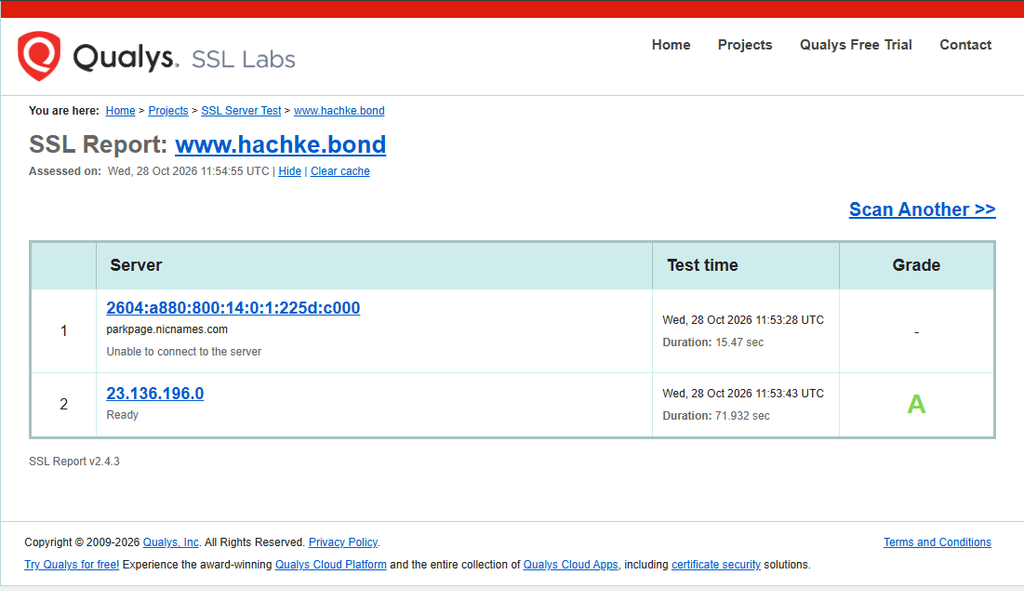
English. The screenshot shows 23.136.196.0 as “Ready” with an A grade. A second IPv6 address, 2604:a880:800:14:0:1:225d:c000, is associated with parkpage.nicnames.com and reports “Unable to connect to the server,” with no grade. This is not enough to conclude that all HTTPS access is broken: it does mean the two listed endpoints did not produce the same result. Check the DNS AAAA record, IPv6 routing/firewall, virtual-host configuration, and whether that IPv6 address is still intended to serve this domain. Re-run SSL Labs after any change.
中文。 截图显示 IPv4 地址 23.136.196.0 状态为 “Ready”,评级为 A。另一个 IPv6 地址 2604:a880:800:14:0:1:225d:c000 指向 parkpage.nicnames.com,检测结果为 “Unable to connect to the server”,没有评级。不能据此断言整个网站的 HTTPS 都不可用,但两个地址的检测结果确实不一致。建议检查 DNS 的 AAAA 记录、IPv6 路由/防火墙、虚拟主机配置,以及该 IPv6 地址是否仍应服务此域名;修改后重新运行 SSL Labs。
2. Performance: good visual stability; tune blocking work and the largest element
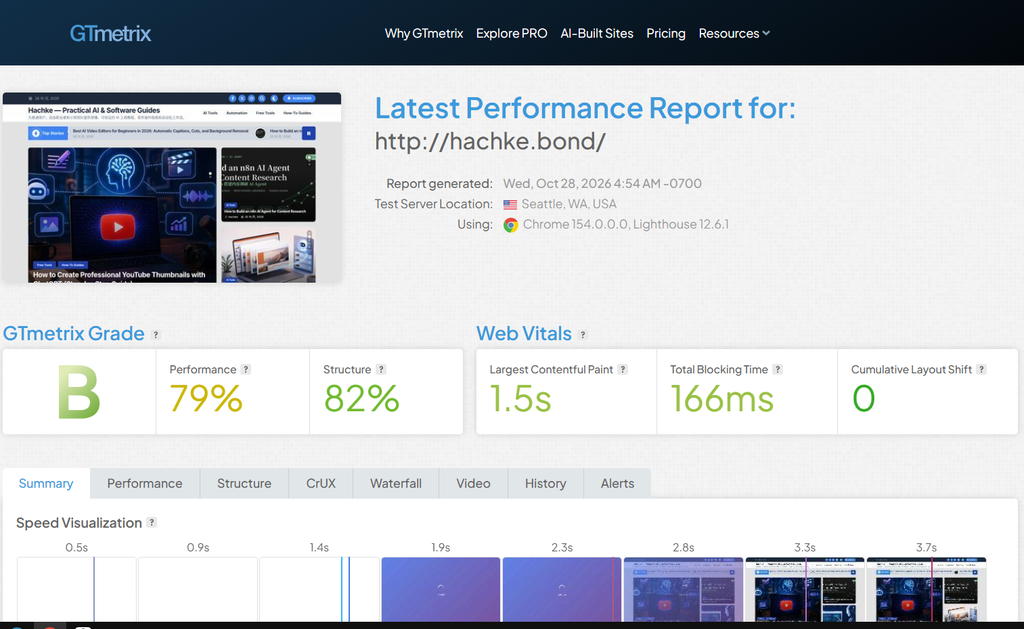
English. GTmetrix reports Grade B, Performance 79%, Structure 82%, LCP 1.5 s, Total Blocking Time (TBT) 166 ms, and Cumulative Layout Shift (CLS) 0. LCP at 1.5 seconds is within Google’s “good” threshold of 2.5 seconds, while CLS 0 indicates no layout shift in this run. TBT at 166 ms is close to—but slightly above—the commonly used 150 ms target. Prioritize identifying the LCP element, compressing/resizing above-the-fold images, serving modern image formats, and deferring or splitting non-critical JavaScript. Then re-test the same URL and test location for a fair comparison. This single lab run does not represent all users or field Core Web Vitals.
中文。 GTmetrix 报告为 B,Performance 79%、Structure 82%、LCP 1.5 秒、TBT 166 毫秒、CLS 0。LCP 1.5 秒低于 Google 建议的 2.5 秒良好阈值;CLS 为 0,说明本次测试没有观察到布局偏移。TBT 166 毫秒略高于常用的 150 毫秒目标。优化时建议先定位 LCP 元素,压缩并按显示尺寸提供首屏图片、使用现代图片格式,并延迟加载或拆分非关键 JavaScript。优化后应使用相同 URL 和测试地点复测,便于比较。单次实验室测试不代表所有访客的真实体验或现场 Core Web Vitals。
3. Uptime monitoring: “Up” is encouraging, but verify the history window
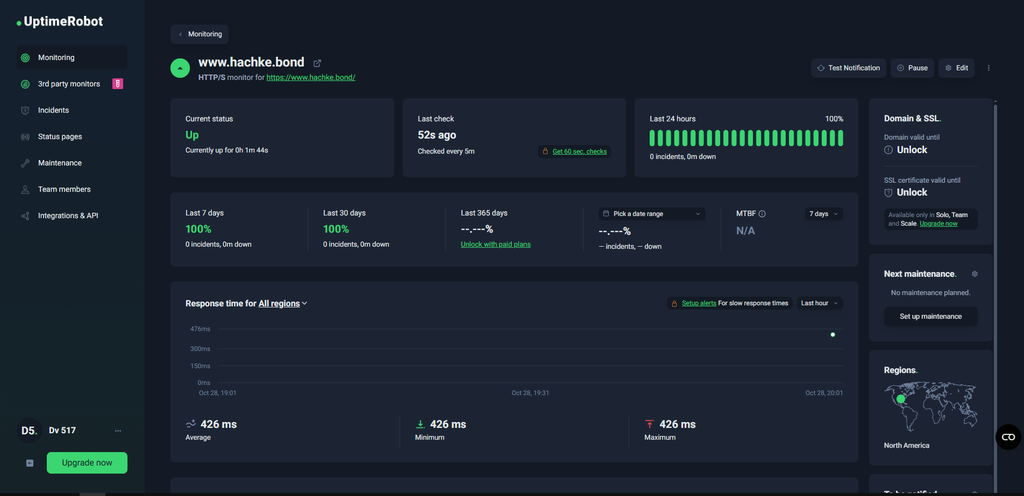
English. The UptimeRobot dashboard shows the HTTPS monitor as Up, a displayed response time of 426 ms, and 100% for the last 24 hours, 7 days, and 30 days, with zero incidents shown. However, the same screenshot says the monitor had been continuously up for only 1 minute 44 seconds and was checked every 5 minutes. Treat the long-window percentages as dashboard values that need confirmation, not as independently established historical uptime—especially if the monitor was just created or reset. Keep the monitor active for several days, verify incident history and alert delivery, and confirm the correct canonical HTTPS URL is being checked.
中文。 UptimeRobot 面板显示 HTTPS 监控状态为 Up,响应时间为 426 毫秒,最近 24 小时、7 天和 30 天均显示 100%,且未显示故障事件。但同一张截图也显示该监控连续正常时间只有 1 分 44 秒,检查间隔为 5 分钟。因此,较长周期的百分比应视为面板显示值,仍需核实其统计历史,尤其是在监控刚创建或重置的情况下。建议保持监控运行数天,确认事件历史和告警投递,并检查监控目标是否为正确的规范 HTTPS URL。
Action plan / 后续行动清单
- Resolve the IPv6 discrepancy. Inspect the domain’s AAAA record and confirm the IPv6 endpoint is intentional and reachable. / 排查 IPv6 不一致。 检查域名 AAAA 记录,确认该 IPv6 地址是否正确且可连接。
- Reduce TBT. Use the GTmetrix Structure/Waterfall tabs to find long JavaScript tasks and third-party scripts. / 降低 TBT。 在 GTmetrix 的 Structure/Waterfall 中定位耗时较长的 JavaScript 任务和第三方脚本。
- Keep uptime monitoring running. Confirm alert contacts, then review the incident log after the monitor has collected meaningful history. / 持续运行可用性监控。 确认告警联系人,并在积累足够历史数据后检查事件记录。
- Repeat and record. Save the scan date, test location, URL, and report for each follow-up run. / 定期复测并记录。 每次复测都保存日期、测试地点、URL 和报告,确保结果可比较。
Method note / 方法说明: Values above are transcribed from the supplied screenshots; they have not been independently re-measured by this article. SSL Labs, GTmetrix, and UptimeRobot may use different test locations, protocols, and time windows, so their results should be interpreted separately.
数据说明: 以上数值均根据用户提供的截图整理,本文没有独立重新测量。SSL Labs、GTmetrix 与 UptimeRobot 的测试地点、协议和统计时间窗口可能不同,应分别解读。
Official references / 官方参考: Qualys SSL Labs · How to read GTmetrix reports · UptimeRobot uptime statistics and reports · Google Core Web Vitals