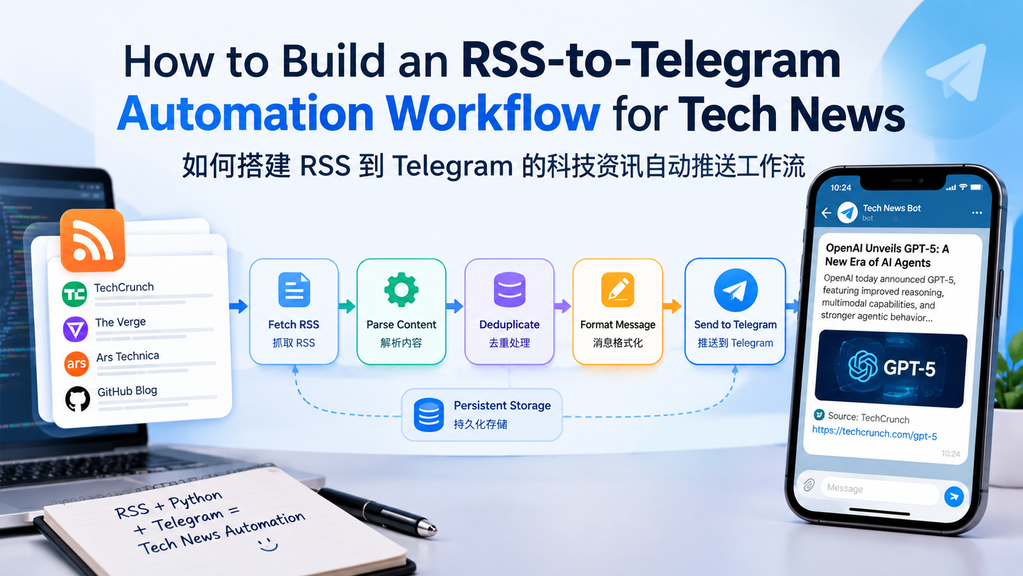
Turn scattered technology feeds into a tidy Telegram briefing—with duplicate protection, sensible rate limits, and a workflow you can run on a laptop, VPS, or scheduled job.
把分散的科技资讯 RSS 源汇总成清晰的 Telegram 简报,并加入去重、发送频率控制和定时运行机制。你可以在个人电脑、VPS 或定时任务环境中部署。
Hands-on guide · Python 3.11+ · feedparser · Telegram Bot API
What this guide delivers: a working starter script, a practical setup checklist, a workflow diagram, a transparent comparison model, and production-hardening tips. The diagrams are original illustrations; the benchmark chart is a planning estimate, not a claim of measured production results.
本文交付内容:可运行的入门脚本、实操配置清单、工作流示意图、透明标注的方案对比,以及生产环境加固建议。文中的流程图为原创示意;对比图属于规划估算,不冒充真实线上压测结果。On this page / 本文目录
- Why RSS-to-Telegram? / 为什么选择 RSS 到 Telegram
- Architecture / 工作流架构
- Set up the Telegram bot / 配置 Telegram Bot
- Build the Python workflow / 编写 Python 工作流
- Run and schedule it / 运行与定时
- Compare approaches / 方案对比
- Reliability and security / 可靠性与安全
- FAQ / 常见问题
1. Why Build an RSS-to-Telegram Tech News Bot?
Technology news is spread across engineering blogs, security advisories, product updates, and research publications. Checking each site manually creates context switching and makes it easy to miss an important release. RSS provides a lightweight, publisher-controlled way to collect new entries, while Telegram offers a convenient delivery channel for a personal chat or a team channel.
科技资讯分散在工程博客、安全公告、产品更新和研究机构网站中。逐个网站查看会不断切换上下文,也容易错过重要发布。RSS 能以较轻量的方式汇集站点更新,而 Telegram 则适合把消息推送到个人聊天或团队频道。
The goal is not to forward every feed item blindly. A useful automation should normalize titles and links, remember what has already been sent, format a readable message, and recover gracefully when a feed or the Telegram API temporarily fails.
目标不是把每条订阅内容不加筛选地转发出去。实用的自动化流程应当规范标题和链接、记录已发送条目、生成易读消息,并在 RSS 源或 Telegram API 暂时失败时具备恢复能力。
2. Workflow Architecture
The simplest reliable design has five stages: fetch feeds, parse entries, filter duplicates, format a message, and send it through the Telegram Bot API. A small local state file records sent item identifiers so the next run does not repost the same story.
一个简单且相对可靠的设计包含五个阶段:抓取 RSS、解析条目、过滤重复内容、格式化消息,再通过 Telegram Bot API 发送。程序用本地状态文件记录已发送条目的标识,避免下一轮重复推送。
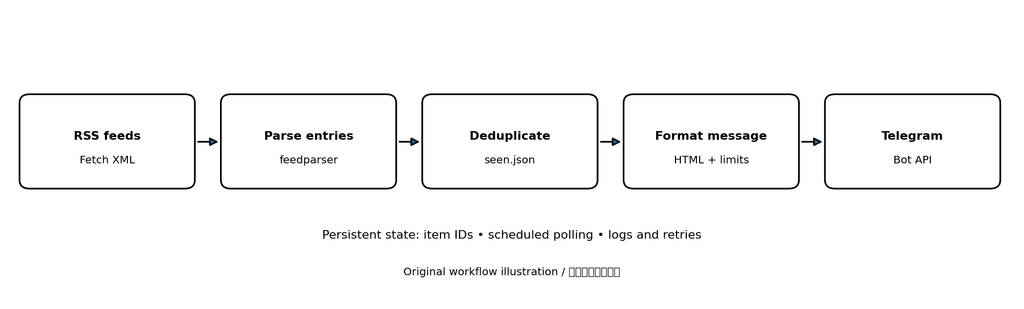
State persistence is what turns a one-off script into a repeatable feed-to-message pipeline.
图 1:原创工作流示意图。持久化状态是关键:它让脚本不只是一次性转发工具,而是可以反复执行的资讯管道。
Minimum viable version
Python + feedparser + Telegram Bot API + a JSON state file.
最小可用版本:Python、feedparser、Telegram Bot API 和 JSON 状态文件。
Production upgrade
SQLite, structured logs, retry/backoff, monitoring, and a scheduler.
生产增强版本:SQLite、结构化日志、重试与退避、监控和调度器。
3. Create a Telegram Bot and Find the Destination
Step 1 — Create the bot
In Telegram, open the official @BotFather account, send /newbot, and follow the prompts. Store the token as a secret. Anyone who obtains it can operate your bot, so do not paste it into public repositories, screenshots, or blog posts.
在 Telegram 中打开官方 @BotFather,发送 /newbot 并按提示完成创建。将 Bot Token 当作密码保存。拿到 Token 的人可能控制你的机器人,因此不要把它提交到公开代码仓库、截图或博客正文中。
Step 2 — Choose a destination
For a private chat, open your new bot and press Start. For a group, add the bot to the group. For a channel, add it as an administrator with permission to post messages. The destination identifier is commonly a numeric chat ID; channel IDs often begin with -100.
个人聊天场景下,打开新建的机器人并点击 Start。群组场景下,将机器人添加进群;频道场景下,将机器人设为管理员并授予发消息权限。目标通常由数字 chat ID 标识,频道 ID 常以 -100 开头。
Security note: Never publish a real bot token or private chat ID in an article. Use environment variables and redact secrets from logs.
安全提示:不要在文章中公开真实 Bot Token 或私人聊天 ID。应使用环境变量,并在日志中对敏感信息脱敏。
Step 3 — Install dependencies
python -m venv .venv
# macOS / Linux
source .venv/bin/activate
# Windows PowerShell
# .venv\Scripts\Activate.ps1

python -m pip install feedparser requests
Use a supported Python release and pin dependency versions for repeatable deployments. The example below deliberately keeps dependencies small so the workflow is easy to inspect and debug.
请使用仍受支持的 Python 版本,并在正式部署时固定依赖版本,以便重复构建。下面的示例刻意保持依赖精简,方便检查和排错。
4. Build the RSS-to-Telegram Python Script
Create a file named rss_to_telegram.py. Replace the sample feed URLs with feeds you are allowed to access, and set the two environment variables before running it.
新建 rss_to_telegram.py 文件,将示例 RSS 地址替换成你有权访问的订阅源,并在运行前设置两个环境变量。
import hashlib
import json
import os
import time
from pathlib import Path
from html import escape

import feedparser
import requests

FEEDS = [
    "https://www.technologyreview.com/feed/",
    "https://hnrss.org/frontpage",
]
STATE_FILE = Path("seen.json")
MAX_ITEMS_PER_RUN = 10
TELEGRAM_LIMIT = 3900  # Keep below Telegram's message limit with room to spare.
BOT_TOKEN = os.environ["TELEGRAM_BOT_TOKEN"]
CHAT_ID = os.environ["TELEGRAM_CHAT_ID"]


def load_seen():
    if not STATE_FILE.exists():
        return set()
    try:
        data = json.loads(STATE_FILE.read_text(encoding="utf-8"))
        return set(data if isinstance(data, list) else [])
    except (json.JSONDecodeError, OSError):
        # Do not silently overwrite corrupt state; fail visibly instead.
        raise RuntimeError(f"Could not read {STATE_FILE}; back it up and inspect it.")


def save_seen(seen):
    # Keep state bounded so the file does not grow forever.
    STATE_FILE.write_text(
        json.dumps(sorted(seen)[-5000:], ensure_ascii=False, indent=2),
        encoding="utf-8",
    )


def entry_id(entry):
    raw = entry.get("id") or entry.get("guid") or entry.get("link") or entry.get("title", "")
    return hashlib.sha256(raw.encode("utf-8")).hexdigest()


def send_telegram(text):
    url = f"https://api.telegram.org/bot{BOT_TOKEN}/sendMessage"
    response = requests.post(
        url,
        data={
            "chat_id": CHAT_ID,
            "text": text,
            "parse_mode": "HTML",
            "disable_web_page_preview": False,
        },
        timeout=20,
    )
    response.raise_for_status()
    payload = response.json()
    if not payload.get("ok"):
        raise RuntimeError(f"Telegram API error: {payload}")
    return payload


def main():
    seen = load_seen()
    newly_seen = []
    sent_count = 0

    for feed_url in FEEDS:
        parsed = feedparser.parse(feed_url)
        if parsed.bozo and not parsed.entries:
            print(f"WARN feed parse failed: {feed_url}: {parsed.bozo_exception}")
            continue

        for entry in parsed.entries:
            uid = entry_id(entry)
            if uid in seen:
                continue

            title = escape(entry.get("title", "Untitled"))
            link = escape(entry.get("link", ""), quote=True)
            source = escape(parsed.feed.get("title", feed_url))
            message = f"<b>{title}</b>\n{source}\n<a href=\\"{link}\\">Read article</a>"

            if len(message) > TELEGRAM_LIMIT:
                message = message[:TELEGRAM_LIMIT - 1] + "…"

            try:
                send_telegram(message)
                seen.add(uid)
                newly_seen.append(uid)
                sent_count += 1
                print(f"SENT {source}: {title[:100]}")
            except (requests.RequestException, RuntimeError) as exc:
                print(f"ERROR sending item {uid}: {exc}")
                # Stop this feed run on send failure to avoid marking unsent items.
                save_seen(seen)
                return

            if sent_count >= MAX_ITEMS_PER_RUN:
                break
            time.sleep(1)  # Be polite to the API and destination.
        if sent_count >= MAX_ITEMS_PER_RUN:
            break

    save_seen(seen)
    print(f"Done. Sent {sent_count} item(s); state updated.")


if __name__ == "__main__":
    main()
Implementation detail: In the Python code above, use normal HTML tag characters in the actual .py file. The display escapes them for safe inclusion in this HTML article. The message line in your script should be:message = f"<b>{title}</b>\n{source}\n<a href=\\"{link}\\">Read article</a>"
When copying from this article, replace the visible </> entities in that line with literal </> characters.
实现细节:由于代码需要嵌入 HTML 正文,示例中的 HTML 标签可能以实体形式显示。复制到真实的 Python 文件时,请将消息模板中的实体还原为普通的尖括号标签。不要把 Token 写死在代码里。
Configure environment variables
# macOS / Linux
export TELEGRAM_BOT_TOKEN="123456:replace_me"
export TELEGRAM_CHAT_ID="123456789"
python rss_to_telegram.py

# Windows PowerShell
$env:TELEGRAM_BOT_TOKEN="123456:replace_me"
$env:TELEGRAM_CHAT_ID="123456789"
python .\rss_to_telegram.py
The first successful run sends recent entries up to the configured cap and records their IDs. Subsequent runs skip IDs already in seen.json. For a busy feed, consider an initial “baseline” mode that records existing entries without sending them, so the first run does not flood your chat.
首次成功运行时,程序会在数量上限内发送近期条目并记录 ID。之后运行会跳过 seen.json 中已有的条目。如果订阅源更新频繁,可以增加“基线模式”:首次只记录现有条目、不发送消息,避免初始化时刷屏。
5. Test the Workflow and Schedule It
Test in a private chat before adding the bot to a busy group. Confirm that a new feed item arrives, the link opens the original article, a second run does not resend the same item, and an invalid token produces a visible error instead of silently losing data.
先在个人聊天中测试,再把机器人加入活跃群组。确认新条目能够到达、链接能打开原文、第二次运行不会重复发送,并且错误 Token 会产生可见报错,而不是静默丢失数据。
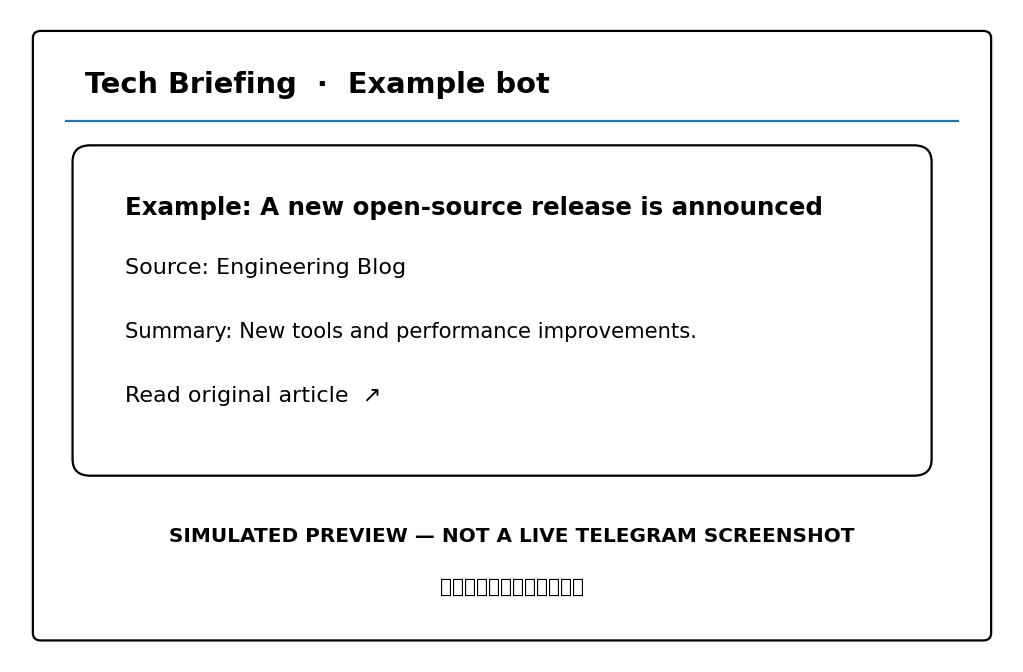
图 2:消息布局示意与测试清单。该图是原创界面示意,不是从真实 Telegram 账号截取的实操截图。
Schedule on Linux with cron
After a manual run succeeds, use the absolute path to your virtual environment’s Python executable and the script. Create a log directory first, and make sure the environment variables are available to the scheduled process.
手动运行成功后,再使用虚拟环境中 Python 可执行文件和脚本的绝对路径配置定时任务。请先创建日志目录,并确保定时进程能够读取所需环境变量。
# Example crontab entry: run every 15 minutes.
*/15 * * * * cd /opt/rss-bot && /opt/rss-bot/.venv/bin/python rss_to_telegram.py >> logs/rss-bot.log 2>&1
For a production deployment, prefer a systemd service/timer, Docker with a scheduler, or a managed job runner if you need restart policies, secret management, and centralized logs. Avoid running overlapping instances against the same JSON state file; use a lock or a database if concurrent runs are possible.
正式部署时,如果需要自动重启、密钥管理和集中日志,可考虑 systemd service/timer、带调度器的 Docker 环境或托管任务平台。不要让多个实例同时读写同一个 JSON 状态文件;如果可能并发运行,应加入锁机制或改用数据库。
6. Compare Automation Approaches
There is no universal winner. A small Python script is transparent and inexpensive, while a no-code platform can reduce setup time and a database-backed service can handle larger volumes more safely. Choose based on feed count, operational ownership, and how much failure recovery you need.
没有适用于所有场景的唯一最佳方案。小型 Python 脚本透明且成本低;无代码平台能缩短搭建时间;基于数据库的服务则更适合安全处理较大规模的数据。选择时应考虑订阅源数量、维护责任以及故障恢复要求。
| Approach / 方案 | Setup effort / 搭建成本 | Control / 可控性 | Best fit / 适用场景 |
|---|---|---|---|
| Python + JSON | Low / 低 | High / 高 | Personal digest, small team / 个人简报、小团队 |
| No-code automation | Low–medium / 低至中 | Medium / 中 | Fast prototype, visual editing / 快速原型、可视化维护 |
| Python + SQLite/PostgreSQL | Medium–high / 中至高 | High / 高 | Many feeds, audit trail, concurrent jobs / 多源、审计记录、并发任务 |
表格对比的是典型特征,而不是对某个具体平台的绝对排名。实际搭建成本取决于现有技术栈、部署环境和维护经验。
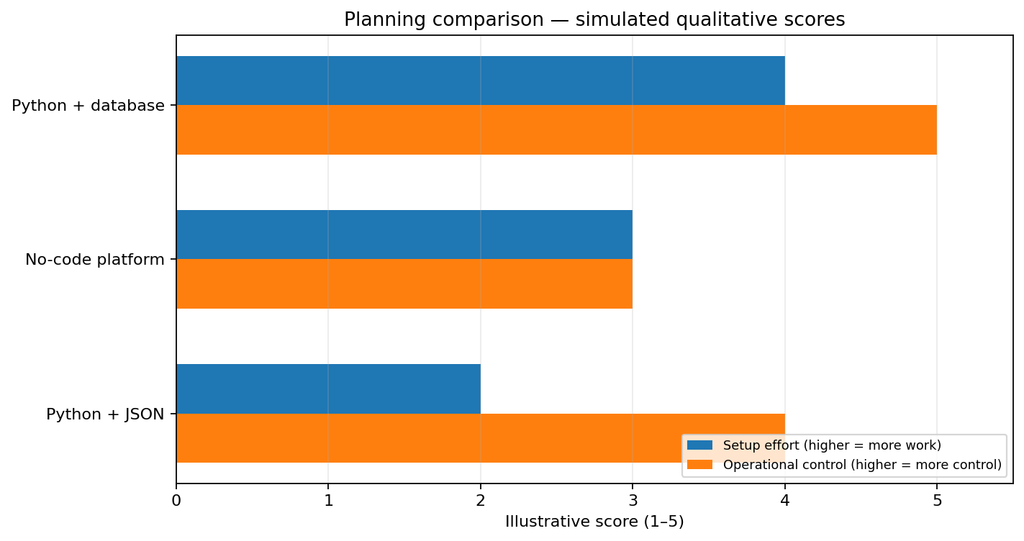
图 3:原创定性对比图。评分是基于典型使用方式的 1–5 级规划估算,并非计时实验或负载测试结果。若用于技术评测,请在同一环境下实测并替换这些估算值。
A reproducible test plan
To publish a defensible benchmark, run each implementation against the same set of feeds, with the same number of entries and the same network conditions. Record cold-start setup time, end-to-end delivery latency, duplicate rate across repeated runs, failure recovery, and operator effort. Repeat each run several times and report the median plus the test environment.
如果要发布可复核的基准测试,请让每种实现处理相同的 RSS 源、相同数量的条目,并尽量保持网络条件一致。记录首次配置耗时、端到端送达延迟、重复运行时的重复推送率、故障恢复情况和维护工作量。每组重复测试多次,报告中位数及测试环境。
7. Reliability, Deduplication, and Security
Deduplicate with stable identifiers
Prefer the feed’s GUID or ID, then its canonical link, and only then a title-based fallback. Titles can change, and some publishers reuse weak identifiers. For a larger system, store the feed URL, item ID, publication timestamp, delivery status, and Telegram message ID in SQLite or PostgreSQL.
去重时优先使用 RSS 条目的 GUID 或 ID,其次使用规范化链接,最后才考虑基于标题的回退方案。标题可能被修改,有些发布方也会使用不稳定的标识。更大规模的系统可以在 SQLite 或 PostgreSQL 中保存源地址、条目 ID、发布时间、发送状态和 Telegram 消息 ID。
Handle failures without losing items
Use request timeouts, bounded retries with exponential backoff, and clear logs. Do not mark an item as sent until Telegram confirms success. If a process crashes after Telegram accepts a message but before local state is saved, a duplicate can still occur; eliminating that final window requires a more careful delivery ledger and reconciliation strategy.
为网络请求设置超时,使用有上限的指数退避重试,并记录清晰日志。只有 Telegram 确认发送成功后,才应把条目标记为已发送。如果 Telegram 已接收消息,但程序在保存本地状态前崩溃,仍可能出现重复消息;要缩小这一窗口,需要更完善的投递账本和对账策略。
Respect publishers and recipients
- Use official RSS feeds where available and follow each publisher’s terms.
- Send links and short titles rather than copying full articles.
- Keep a reasonable polling interval; do not hammer feed servers.
- Use environment variables or a secret manager for bot credentials.
- Set a per-run item cap and consider quiet hours for group channels.
建议使用网站提供的官方 RSS 并遵守其使用条款;优先发送链接和简短标题,不要整篇复制文章;设置合理的抓取间隔,避免给源站造成压力;通过环境变量或密钥管理器保存机器人凭据;限制每轮推送数量,并可为群组设置免打扰时段。
8. SEO-Friendly Improvements and FAQ
For a useful technology article, answer the searcher’s core question early, use descriptive headings, include copyable code, and explain the limits of the implementation. Keep the page title concise, write a unique meta description, use descriptive alt text for diagrams, and link to the official Telegram Bot API and the RSS sources you actually use.
一篇对读者真正有用的技术文章,应尽早回答核心问题,使用清晰的小标题,提供可复制代码,并说明实现边界。页面标题要简洁,撰写独立的 Meta Description,为示意图添加描述性 alt 文本,并链接到 Telegram Bot API 官方文档及实际使用的 RSS 源。
Frequently asked questions
Can I run the RSS-to-Telegram bot for free?
Usually, yes. Python and RSS are free to use, and the script can run on a computer you already own. A VPS, managed scheduler, or monitoring service may introduce costs.
通常可以。Python 和 RSS 本身可免费使用,脚本也能运行在已有电脑上。如果使用 VPS、托管调度器或监控服务,则可能产生费用。
How often should the bot check RSS feeds?
Start with 10–30 minutes for ordinary technology feeds, then adjust based on publisher guidance and how quickly you need updates. Respect cache headers and avoid unnecessarily frequent polling.
普通科技资讯源可以先从每 10–30 分钟检查一次开始,再根据源站建议和时效需求调整。应尊重缓存相关响应头,避免不必要的高频抓取。
Why are duplicate messages appearing?
Common causes include missing or unstable item IDs, multiple overlapping instances, a state file that is not persisted, or a crash between delivery and state update. Use stable identifiers and a database or lock when concurrency is possible.
常见原因包括条目 ID 缺失或不稳定、多个实例重叠运行、状态文件未持久化,或消息发送成功后状态更新前发生崩溃。应使用稳定标识,并在可能并发时使用数据库或锁机制。
Can I filter by keywords such as AI, cybersecurity, or open source?
Yes. Add a case-insensitive keyword filter against the title and summary before sending. For more precise classification, use source-specific rules or a separate tagging step, and keep the original article link in every notification.
可以。在发送前对标题和摘要执行不区分大小写的关键词筛选,例如 AI、网络安全或开源。若需要更精确的分类,可以增加按来源配置的规则或独立标签步骤,并在每条通知中保留原文链接。
Recommended next step: start with two feeds and a private Telegram chat, validate duplicate handling, then add feeds gradually. Once the workflow becomes important to a team, move state to SQLite and add monitoring before increasing volume.
建议的下一步:先用两个 RSS 源和个人 Telegram 聊天完成验证,确认去重逻辑正常后再逐步增加订阅源。当这套流程成为团队的重要工具时,应先把状态迁移到 SQLite 并加入监控,再扩大消息量。
Editorial note: This article is a practical starter guide, not a claim that a live deployment or performance benchmark has been executed. Validate feed URLs, API permissions, and current Telegram limits before production use.
说明:本文是实操入门指南,不声称已在真实生产环境完成部署或性能压测。正式使用前,请验证 RSS 地址、API 权限及 Telegram 当前限制。
Suggested WordPress tags: RSS automation, Telegram bot, Python automation, tech news, RSS feed reader, Telegram Bot API.
建议 WordPress 标签:RSS 自动化、Telegram 机器人、Python 自动化、科技资讯、RSS 阅读器、Telegram Bot API。