We tested Gamma AI by generating a bilingual presentation and reviewing its structure, visual design, content organization, and limitations. Discover what AI PPT generators can do and what still requires human review.
本文通过 Gamma 生成中英文双语演示文稿,分析其内容结构、视觉设计、排版效果与实际局限,帮助你了解 AI PPT 生成器的优势,以及正式使用前仍需人工检查的环节。
1. Introduction: Can AI Really Create a Usable PowerPoint Presentation?
一、引言:AI 真的能生成可以使用的 PPT 吗?
Creating a professional PowerPoint presentation takes more than writing a few paragraphs. You need to organize information, design slides, choose images, maintain consistent typography, and make sure the final presentation tells a clear story. AI presentation makers promise to simplify this process by turning a short prompt into a structured slide deck.
制作一份专业的 PowerPoint 演示文稿,并不只是写几段文字那么简单。你还需要整理信息、设计页面、选择图片、统一字体,并确保整份演示文稿逻辑清晰。AI PPT 生成工具试图简化这一过程,让用户通过一段简单的提示词,快速生成具有基本结构的幻灯片。
But can an AI-generated presentation actually save time without creating new editing problems? To explore this question, we used Gamma to create a bilingual presentation titled “How AI Writing Tools Improve Team Productivity.” We then reviewed the generated slides for content structure, bilingual readability, visual relevance, and practical usability.
但是,AI 生成的 PPT 是否真的能够节省时间,而不是带来新的修改问题?为了了解这一点,我们使用 Gamma 制作了一份名为“How AI Writing Tools Improve Team Productivity”的中英文双语演示文稿,并从内容结构、双语可读性、图片相关性和实际使用价值等方面进行观察。
Test scope: This review is based on screenshots of the ten generated slides. Actual export compatibility, generation time, and quantitative productivity improvements have not yet been measured. We will not present unverified results as test data.
测试范围说明: 本文基于实际生成的 10 页幻灯片截图进行分析。PPTX 导出兼容性、生成耗时以及量化效率提升尚未完成测试,因此不会将未经验证的数据当作实测结果。
2. What Is Gamma AI?
二、Gamma AI 是什么?
Gamma is an AI-powered presentation and visual-content creation tool. Instead of starting with a blank slide, users can describe a topic and let the tool generate an initial structure, text, and visual layout. The result can then be edited to better match a specific audience or purpose.
Gamma 是一款 AI 演示文稿与视觉内容创作工具。与从空白幻灯片开始制作不同,用户可以直接描述主题,让工具生成初步的内容结构、文字和页面布局,再根据实际受众和使用目的进行调整。
It can be useful for business presentations, educational materials, project proposals, product introductions, and knowledge-sharing sessions. However, AI-generated content should still be reviewed before it is used in professional or public-facing materials.
它适用于商务汇报、教学课件、项目方案、产品介绍和知识分享等场景。不过,在正式商务活动或公开发布之前,仍然需要对 AI 生成的内容进行人工审核。
Official website: Gamma
官方网站: Gamma
3. Our Test: Generating a Bilingual Presentation
三、实测过程:生成一份中英文双语演示文稿
For this test, we asked Gamma to create a presentation about how AI writing tools can improve team productivity. The generated deck contained ten slides covering common writing problems, core features, business use cases, workflows, comparisons, costs, privacy risks, implementation recommendations, and a conclusion.
本次测试中,我们让 Gamma 生成一份关于 AI 写作工具如何提升团队效率的演示文稿。最终截图展示了 10 页内容,涵盖常见写作问题、核心功能、业务应用场景、工作流程、传统与 AI 写作对比、成本、隐私风险、落地建议和总结。
The presentation used English headings with Chinese translations and supporting explanations. This gave us an opportunity to observe how Gamma organizes bilingual information on the same slide.
这份演示文稿采用英文标题搭配中文翻译和补充说明的方式,使我们能够观察 Gamma 如何在同一页面中组织双语信息。
Test 1: The Cover Slide
实测一:封面设计
[Insert Screenshot 1: Bilingual Presentation Cover]
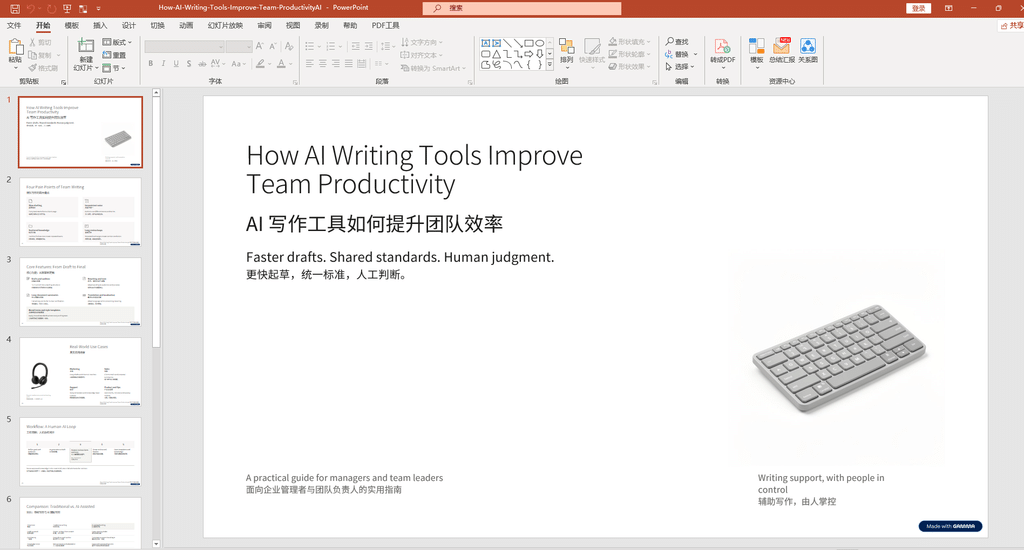
The cover presents the English title “How AI Writing Tools Improve Team Productivity,” followed by the Chinese title “AI 写作工具如何提升团队效率.” The layout separates the title, supporting text, and image into distinct areas, creating a clean and readable first impression.
封面展示了英文标题“How AI Writing Tools Improve Team Productivity”,并配有中文标题“AI 写作工具如何提升团队效率”。标题、说明文字和图片被安排在不同区域,整体布局简洁,信息层次比较清晰。
One weakness is the image choice. The keyboard looks professional, but it does not communicate the topic of AI writing tools particularly well. An image of an AI writing interface, document collaboration, or a digital workflow might establish a stronger connection between the visual and the subject.
不足之处在于图片选择。键盘图片具有一定的科技感,但与 AI 写作工具的主题联系不够直接。如果换成 AI 写作界面、文档协作场景或数字化工作流程,可能更容易让读者理解页面主题。
Our observation: The bilingual title structure is clear, but the cover image could be more relevant.
实测观察: 双语标题结构清楚,但封面图片与主题的关联性还有提升空间。
Test 2: Organizing Common Pain Points
实测二:整理常见痛点
[Insert Screenshot 2: Four Pain Points of Team Writing]
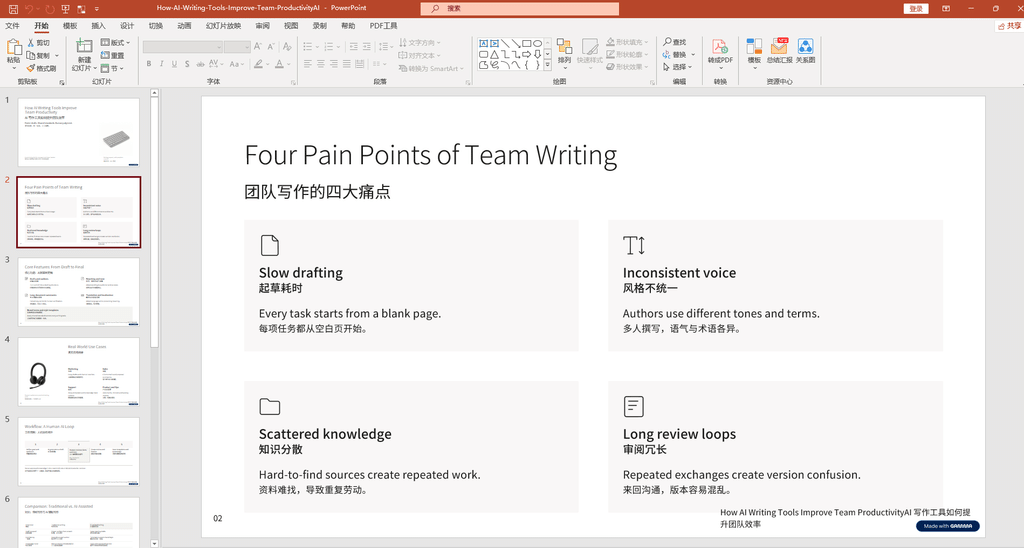
Gamma organized the content into four cards: slow drafting, inconsistent voice, scattered knowledge, and long review loops. Each card contains a short heading and a brief explanation, making the page easy to scan.
Gamma 将内容整理成四张卡片,分别对应起草耗时、风格不统一、知识分散和审阅周期长。每张卡片都包含简短标题和解释,方便读者快速浏览。
This layout works well for presentations because it breaks a broad topic into smaller, recognizable problems. It can be especially useful when introducing a product or explaining why a team might need a new workflow.
这种布局适合演示文稿,因为它将一个较大的主题拆分成多个容易理解的问题。在介绍产品或解释团队为什么需要改变工作流程时,这种结构尤其有用。
However, these pain points are presented as a framework, not as the findings of a formal survey. They should not be interpreted as statistically verified business results.
不过,这些痛点目前只是演示文稿中的分析框架,并非正式调查的研究结果,因此不能将它们理解为经过统计验证的商业结论。
Our observation: The card layout improves readability, but the claims would need independent evidence in a research-based presentation.
实测观察: 卡片布局有利于阅读;如果用于研究型演示,还需要为相关结论补充独立证据。
Test 3: Presenting Core Features
实测三:展示核心功能
[Insert Screenshot 3: Core Features — From Draft to Final]
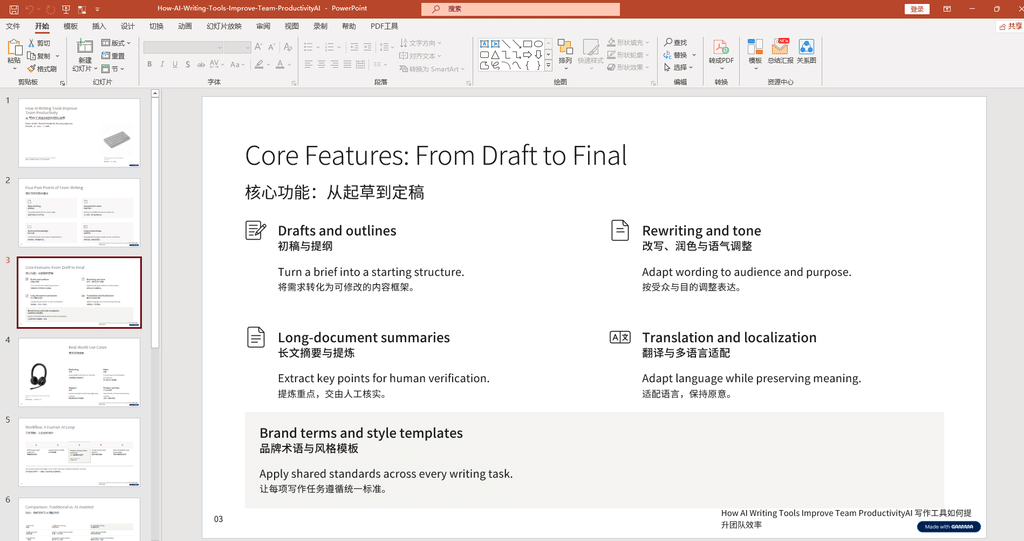
The slide groups AI writing capabilities into drafts and outlines, rewriting and tone adjustment, long-document summaries, translation and localization, and brand terminology and style templates.
这一页将 AI 写作能力分为初稿与提纲、改写与语气调整、长文摘要、翻译与本地化,以及品牌术语和风格模板等类别。
Rather than listing features without context, the presentation connects them to a broader writing process. This is a useful approach because the value of a tool often depends on how well it fits into an existing workflow.
与简单罗列功能名称相比,这种组织方式尝试将各项功能放进完整的写作流程中。这一点值得借鉴,因为一款工具的实际价值,往往取决于它能否融入现有工作流程。
Still, a well-organized feature slide does not prove that every feature works equally well in practice. Output quality depends on the tool, the input material, and the amount of human review required.
不过,功能分类清晰并不意味着每项功能在实际使用中都同样出色。最终效果仍取决于具体工具、输入材料质量以及所需的人工审核程度。
Our observation: The slide has a logical structure, but actual feature performance requires separate testing.
实测观察: 页面功能结构合理,但各项功能的实际表现仍需分别测试。
Test 4: Real-World Use Cases
实测四:实际应用场景
[Insert Screenshot 4: Real-World Use Cases]
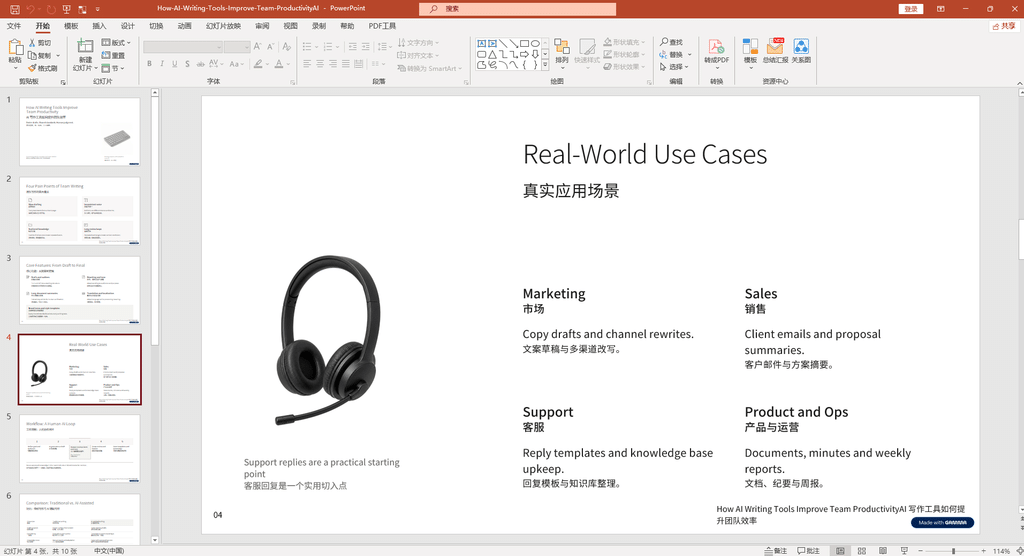
Gamma presents four potential use cases: marketing, sales, customer support, and product operations. Examples include drafting marketing copy, summarizing client proposals, preparing customer-service templates, and organizing operational documents.
Gamma 展示了四类潜在应用场景:营销、销售、客服和产品运营。具体示例包括撰写营销文案、整理客户方案摘要、准备客服回复模板,以及整理运营文档。
These examples are practical because they involve recurring text-based tasks. AI may help produce an initial draft or organize existing information, while people can focus on checking details and adapting the content to the intended audience.
这些场景具有一定的实用性,因为它们涉及重复出现的文字处理任务。AI 可以协助生成初稿或整理已有信息,让工作人员把更多精力放在核对细节和调整受众表达上。
For sensitive customer communications or business documents, AI-generated text should be checked against the actual facts before it is sent or published.
对于涉及客户沟通或商业文件的内容,在发送或发布之前,应当将 AI 生成的文字与真实业务信息进行核对。
Our observation: The examples are easy to understand, but they are illustrative use cases rather than measured productivity results.
实测观察: 应用示例容易理解,但它们属于场景说明,而不是经过量化测量的效率提升结果。
Test 5: The Human-AI Workflow
实测五:人机协作流程
[Insert Screenshot 5: Workflow — A Human-AI Loop]
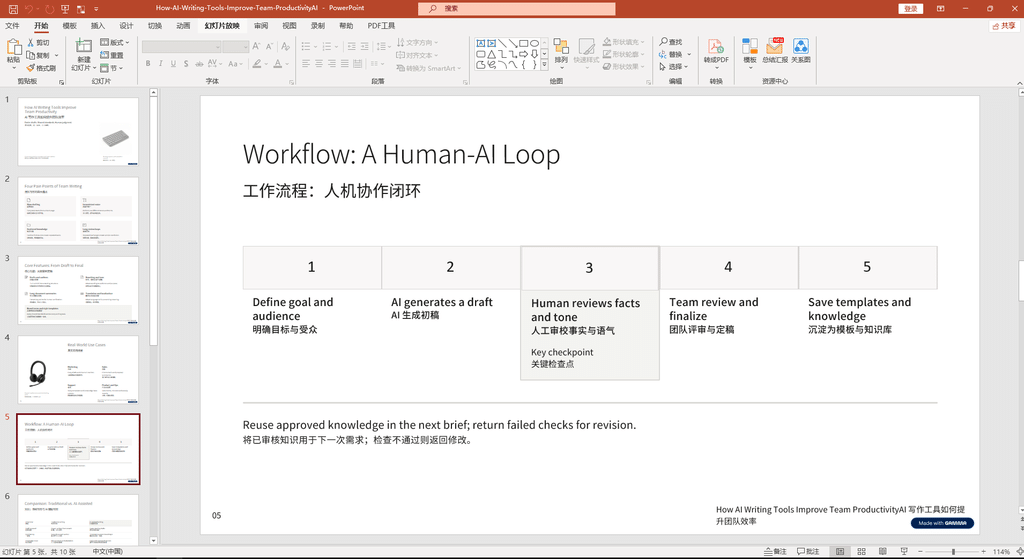
The slide presents a five-step process: define the goal and audience, generate an AI draft, review facts and tone, finalize the content with the team, and save reusable templates and knowledge.
这一页展示了五个步骤:明确目标与受众、由 AI 生成初稿、人工审核事实和语气、团队审阅并定稿,以及保存可复用的模板与知识。
This is one of the most useful ideas in the presentation. Instead of treating AI as a tool that automatically produces perfect results, the workflow gives people responsibility for verification and final decisions.
这是整份演示文稿中比较值得借鉴的思路之一。它没有把 AI 描述成能够自动产出完美结果的工具,而是让人类负责信息核验和最终决策。
For AI-assisted work, the key question is not simply whether a draft can be generated quickly. It is whether the complete workflow—including review and revision—becomes more efficient without reducing quality.
对于 AI 辅助工作,关键问题并不只是能否快速生成初稿,而是包含审核与修改在内的整个流程,能否在不降低质量的前提下变得更加高效。
Our observation: The human-review step is a sensible workflow recommendation, although its actual efficiency gains have not been measured in this test.
实测观察: 人工审核环节的设置比较合理,但本次测试尚未量化这种流程能够带来的实际效率提升。
Test 6: Traditional Writing vs. AI-Assisted Writing
实测六:传统写作与 AI 辅助写作对比
[Insert Screenshot 6: Comparison — Traditional vs. AI-Assisted]
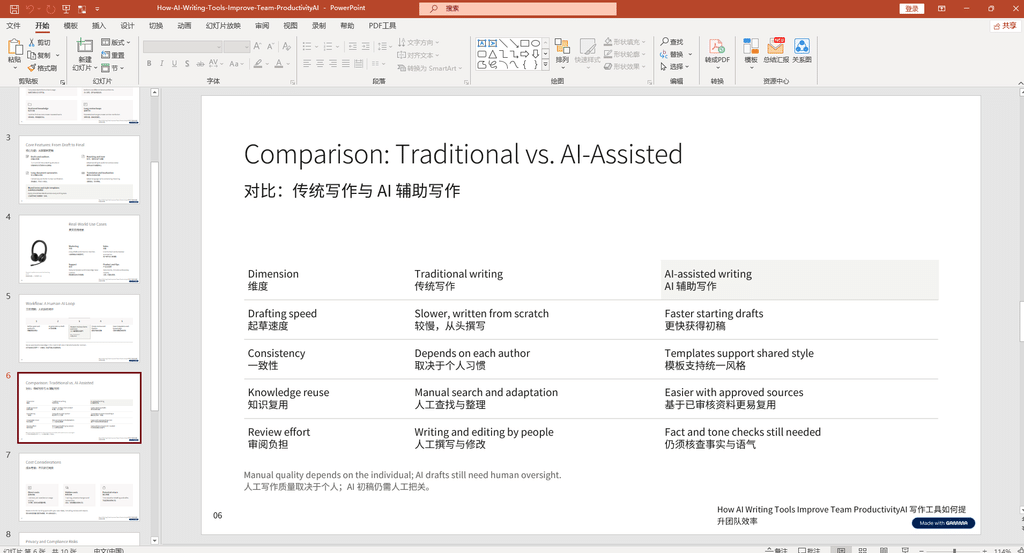
The comparison table covers drafting speed, consistency, knowledge reuse, and review effort. It provides a concise way to explain the potential differences between traditional writing and AI-assisted workflows.
这张对比表从起草速度、一致性、知识复用和审阅工作量等方面进行比较,为解释传统写作与 AI 辅助流程的潜在差异提供了一个简洁框架。
However, the table contains qualitative statements rather than results from a controlled experiment. We cannot use this screenshot alone to claim a specific percentage of time saved or a proven improvement in team productivity.
不过,这张表格呈现的是定性描述,并非来自对照实验的测试结果。因此,仅凭这张截图,我们不能声称 AI 能节省某个具体比例的时间,也不能证明团队生产力已经得到提升。
The screenshot also shows scrollbars or interface elements around the table. We need to inspect the exported PowerPoint file before determining whether these elements affect the final presentation.
截图中还可以看到表格周围的滚动条或界面元素。在检查实际导出的 PowerPoint 文件之前,我们无法确定这些元素是否会影响最终演示效果。
Our observation: The comparison is easy to follow, but quantitative claims and export compatibility remain unverified.
实测观察: 对比逻辑比较清楚,但量化结论和导出兼容性尚未验证。
Test 7: Understanding the Full Cost
实测七:理解工具的完整成本
[Insert Screenshot 7: Cost Considerations]
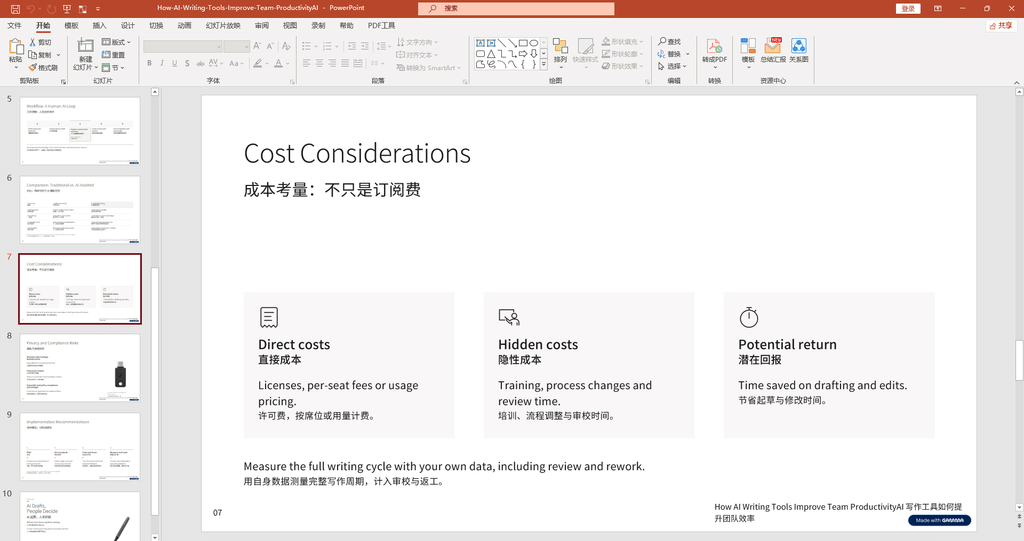
The slide distinguishes direct costs, hidden costs, and potential returns. Direct costs may include subscriptions or usage fees, while hidden costs can include training, workflow changes, review, and rework.
这一页将成本分为直接成本、隐性成本和潜在回报。直接成本可能包括订阅费或按量计费,而隐性成本则可能包括培训、流程调整、审核和返工。
This is a useful way to evaluate AI tools. The cheapest subscription is not necessarily the best option if the output requires extensive manual correction. Likewise, a paid tool may be worthwhile if it consistently reduces the total time needed to complete a task.
这种分析方式有助于更全面地评估 AI 工具。订阅费最低的工具未必最划算,因为如果生成结果需要大量人工修正,总体成本仍然可能很高。反过来,如果付费工具能够稳定地缩短任务完成时间,也可能具有更高的实际价值。
A practical evaluation should measure the entire workflow: preparation time, generation time, editing time, and final review time. This test has not yet collected those measurements.
更实际的评估方法是记录整个工作流程的耗时,包括准备时间、生成时间、编辑时间和最终审核时间。本次测试尚未收集这些数据。
Our observation: The cost framework is useful, but no cost-saving percentage can be claimed without timing data.
实测观察: 这套成本分析框架具有参考价值,但在没有实际计时数据的情况下,不能声称工具节省了某个比例的成本。
Test 8: Privacy and Compliance Risks
实测八:隐私与合规风险
[Insert Screenshot 8: Privacy and Compliance Risks]
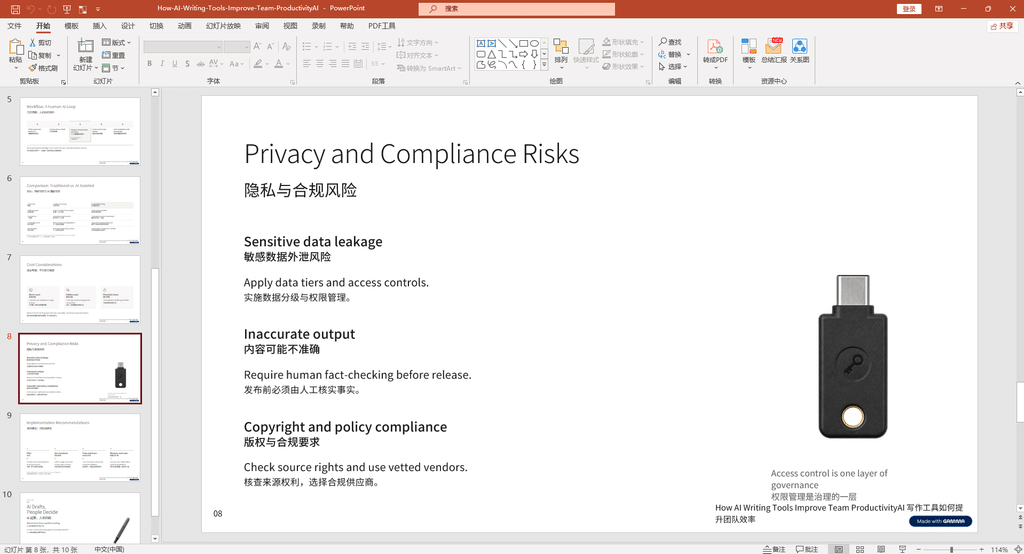
The slide highlights sensitive-data exposure, inaccurate output, and copyright or policy compliance. These are important considerations when using AI tools for business documents or public content.
这一页强调了敏感数据泄露、输出内容不准确,以及版权和使用政策合规等问题。这些因素在使用 AI 处理商业文件或公开内容时尤其值得关注。
Before uploading internal documents, customer details, or confidential plans, users should review the provider’s data policies and follow their organization’s security requirements. AI-generated facts should also be checked against reliable sources.
在上传内部文件、客户信息或机密计划之前,用户应先查看服务商的数据政策,并遵循所在组织的信息安全要求。同时,对于 AI 生成的事实性内容,也应当通过可靠来源进行核验。
Images, fonts, and other assets may have different licensing conditions. Users should confirm that the materials they use are suitable for their intended purpose.
图片、字体和其他素材可能具有不同的授权条件。用户应当确认所使用的素材适合自己的实际用途,并符合相关许可要求。
Our observation: The slide identifies relevant risks, but a presentation page is not a substitute for a formal security, privacy, or copyright review.
实测观察: 页面指出了相关风险,但演示文稿中的简单说明不能代替正式的信息安全、隐私或版权审查。
Test 9: Implementation Recommendations
实测九:落地实施建议
[Insert Screenshot 9: Implementation Recommendations]
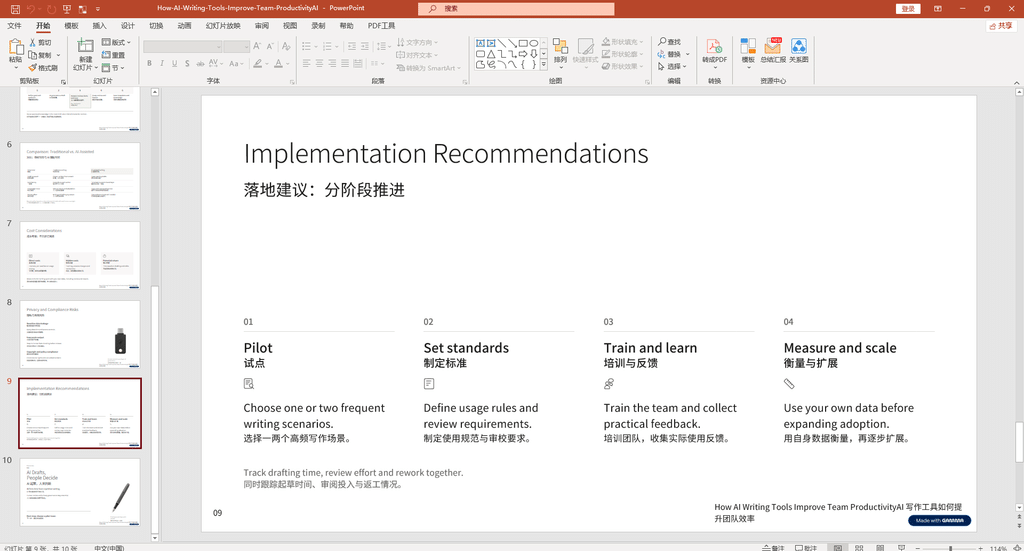
The slide recommends four stages: pilot testing, setting standards, training and learning, and measuring results before scaling up. This approach can help teams introduce AI tools gradually instead of changing every process at once.
这一页提出了四个阶段:试点测试、制定标准、培训与反馈,以及在衡量结果后逐步扩大使用范围。这种方法有助于团队循序渐进地引入 AI 工具,而不是一次性改变所有工作流程。
A practical starting point is to choose one or two recurring tasks, record the current completion time, and compare the results after introducing AI. Teams should also define what information needs human verification before the content is approved.
一种实际的起步方式是,先选择一到两个重复性较高的任务,记录原有完成时间,再比较引入 AI 后的结果。团队还应明确哪些信息必须经过人工核验,才能进入最终交付环节。
Our observation: The staged approach is sensible, but its effectiveness should be evaluated using the team’s own data.
实测观察: 分阶段实施的思路比较合理,但实际效果仍需要通过团队自身的数据进行评估。
Test 10: The Final Conclusion
实测十:最终总结页
[Insert Screenshot 10: AI Drafts, People Decide]
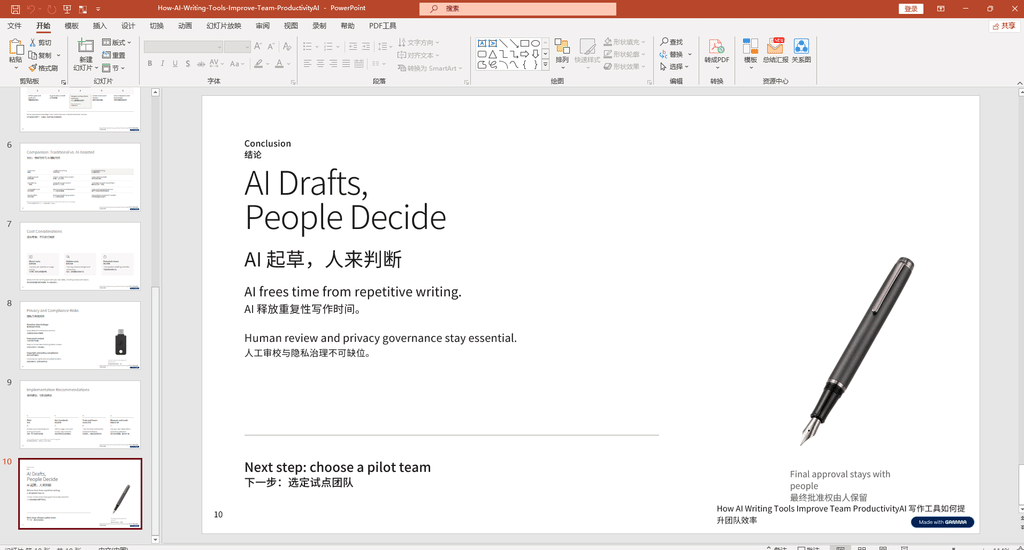
The final slide summarizes the main message: AI can help reduce repetitive writing work, but human review and privacy governance remain essential.
最后一页总结了整份演示文稿的核心观点:AI 可以帮助减少重复性写作工作,但人工审核和隐私治理仍然不可缺少。
The layout is simple and readable. However, the fountain-pen image does not strongly communicate the topic of AI writing tools. A more relevant visual could make the conclusion feel more consistent with the rest of the presentation.
这一页的布局简洁,阅读体验较好。不过,钢笔图片与 AI 写作工具主题的联系并不明显。如果换成更相关的视觉素材,整份演示文稿的主题一致性可能会更好。
Our observation: The conclusion is clear, but the visual choice could be improved.
实测观察: 结论表达清楚,但配图选择仍有改进空间。
4. Technical Evaluation: What Did We Actually Learn?
四、技术评估:这次测试究竟说明了什么?
Based on the ten screenshots, Gamma produced a presentation with a recognizable structure, bilingual text, and several types of layouts. The slides included cards, two-column designs, a process diagram, and a comparison table.
从这 10 张截图来看,Gamma 生成了一份具有基本结构的演示文稿,其中包含双语文字以及多种页面布局,例如卡片式布局、双栏布局、流程图和对比表格。
The strongest result is the organization of information. The presentation moves from common problems to features, use cases, workflow, cost, risks, and recommendations. This sequence gives the deck a logical narrative rather than presenting a random collection of AI-generated slides.
本次较明显的优点是信息组织。演示文稿从常见问题开始,逐步介绍功能、应用场景、工作流程、成本、风险和落地建议,形成了一条相对连贯的叙述线索,而不是简单地堆叠 AI 生成的页面。
The main limitations are visual relevance and the need for further verification. Some images are only loosely related to the subject, and the screenshots alone cannot establish factual accuracy, editing flexibility, export quality, or time savings.
主要局限在于部分图片与主题的关联性不够强,而且仍有多个方面需要进一步验证。仅凭截图无法确认内容的事实准确性、元素可编辑程度、导出质量或实际节省的时间。
| Evaluation Area | Current Result |
|---|---|
| Bilingual content | Observed in the screenshots |
| 内容双语支持 | 截图中已观察到 |
| Content structure | Clear overall sequence |
| 内容结构 | 整体顺序清晰 |
| Visual layout | Clean, with some improvement opportunities |
| 视觉布局 | 整体简洁,仍有改进空间 |
| Image relevance | Some images could match the topic better |
| 图片相关性 | 部分图片需要更贴合主题 |
| Factual accuracy | Not independently verified |
| 事实准确性 | 尚未独立核验 |
| PPTX compatibility | Not tested |
| PPTX 兼容性 | 尚未测试 |
| Generation speed | Not measured |
| 生成速度 | 尚未测量 |
| Productivity gains | Not quantified |
| 效率提升 | 尚未量化 |
The key technical takeaway is that a visually complete slide deck should not automatically be treated as a finished deliverable. A useful evaluation must include content verification, editing effort, export behavior, and the total time needed to produce a presentation that is ready for its intended audience.
最重要的技术结论是:一份视觉上完整的幻灯片,不应自动被视为已经完成的交付成果。真正有价值的评估,还需要考虑内容核验、编辑工作量、文件导出表现,以及制作一份符合目标受众要求的演示文稿所需的总时间。
5. Common Questions About AI PPT Generators
五、AI PPT 生成器常见问题
Can AI generate a PowerPoint presentation from a prompt?
AI 可以根据提示词生成 PPT 吗?
Yes. Tools such as Gamma can generate an initial presentation from a topic description. The generated content should still be reviewed and edited before professional use.
可以。Gamma 等工具能够根据主题描述生成演示文稿初稿。不过,在正式使用之前,仍然需要检查和修改生成内容。
Is Gamma suitable for Chinese presentations?
Gamma 适合制作中文 PPT 吗?
Our screenshots show that Gamma can place Chinese and English text within the same presentation. However, this test does not establish that every layout or font combination will work perfectly. Always inspect the actual slides before delivery.
从本次截图来看,Gamma 能够在同一份演示文稿中安排中文和英文内容。但这并不能证明所有布局和字体组合都能达到理想效果,正式交付前仍应检查实际页面。
Can Gamma export editable PowerPoint files?
Gamma 能导出可编辑的 PowerPoint 文件吗?
Gamma provides PowerPoint export functionality, but we have not yet exported this specific presentation and checked it in PowerPoint. Therefore, the editing experience and layout compatibility remain unverified in this review.
Gamma 提供 PowerPoint 导出功能,但本次尚未实际导出这份演示文稿并在 PowerPoint 中检查。因此,本文还无法确认该文件的编辑体验和布局兼容性。
Is a free AI PPT generator enough for everyday use?
免费 AI PPT 生成器够日常使用吗?
A free plan may be sufficient for occasional drafts or personal projects. Before choosing a tool, check its current limits on generation, export formats, branding, and editing features.
如果只是偶尔制作初稿或个人项目,免费计划可能已经足够。选择工具之前,建议核对其当前的生成额度、导出格式、品牌标识和编辑功能限制。
Should AI-generated slides be used without editing?
AI 生成的幻灯片可以不修改直接使用吗?
For informal brainstorming, the initial output may be a useful starting point. For business presentations, education, or public publication, users should check factual claims, visual relevance, privacy, and formatting.
对于非正式的头脑风暴,AI 初稿可以作为一个有用的起点。但如果用于商务汇报、教学或公开发布,就应检查事实、图片相关性、隐私风险和排版效果。
6. Final Verdict: Use AI to Create the Draft, Not to Skip the Review
六、最终结论:用 AI 生成初稿,不要省略审核
This Gamma test shows that an AI presentation maker can help organize a topic into a structured, bilingual slide deck. The generated slides cover a range of relevant sections and provide a useful starting point for further editing.
本次 Gamma 测试表明,AI 演示文稿工具能够帮助用户将一个主题组织成具有基本结构的双语幻灯片。生成内容覆盖了多个相关章节,可以作为后续编辑的起点。
Its current strengths in this example are content organization and clean layouts. The main areas that still need attention are image relevance, fact-checking, final formatting, and export verification.
在本次案例中,它比较突出的优势是内容组织和简洁的页面布局。仍需重点关注的方面包括图片相关性、事实核验、最终排版以及导出文件验证。
Gamma is worth considering if you need to build a first draft quickly. However, we cannot yet conclude that it is the best AI PPT generator, the fastest option, or the most cost-effective tool because this test did not compare six products under the same conditions.
如果你希望快速搭建演示文稿初稿,Gamma 值得进一步尝试。不过,由于本次测试没有在相同条件下比较六款产品,因此目前还不能认定 Gamma 是最好的 AI PPT 生成器、速度最快的工具或性价比最高的选择。
Our current verdict: Gamma is a promising option for generating presentation drafts, but final quality still depends on human review and editing. Export compatibility, generation time, and comparative performance need further testing.
当前结论: Gamma 可以作为生成演示文稿初稿的候选工具,但最终质量仍然取决于人工审核与修改。文件导出兼容性、生成耗时和横向对比表现还需要进一步测试。
Have you tried an AI presentation maker? Which matters most to you: generation speed, slide design, Chinese-language support, or editable PowerPoint exports? Share your experience in the comments.
你使用过 AI PPT 生成工具吗?对你来说,生成速度、页面设计、中文支持,还是可编辑的 PowerPoint 导出更重要?欢迎在评论区分享你的使用体验。
References
参考资料
- Gamma official website: https://gamma.app/
- Gamma 官方网站:https://gamma.app/
- Gamma Help Center — Exporting presentations: https://help.gamma.app/en/articles/8022861-what-s-the-easiest-way-to-export-my-gamma
- Gamma 帮助中心——演示文稿导出说明:https://help.gamma.app/en/articles/8022861-what-s-the-easiest-way-to-export-my-gamma
Editorial note: This article analyzes screenshots from an actual Gamma-generated presentation. Tests that have not been completed are explicitly identified as unverified.
编辑说明:本文分析了实际由 Gamma 生成的演示文稿截图。尚未完成的测试项目均已明确标注为未经验证。