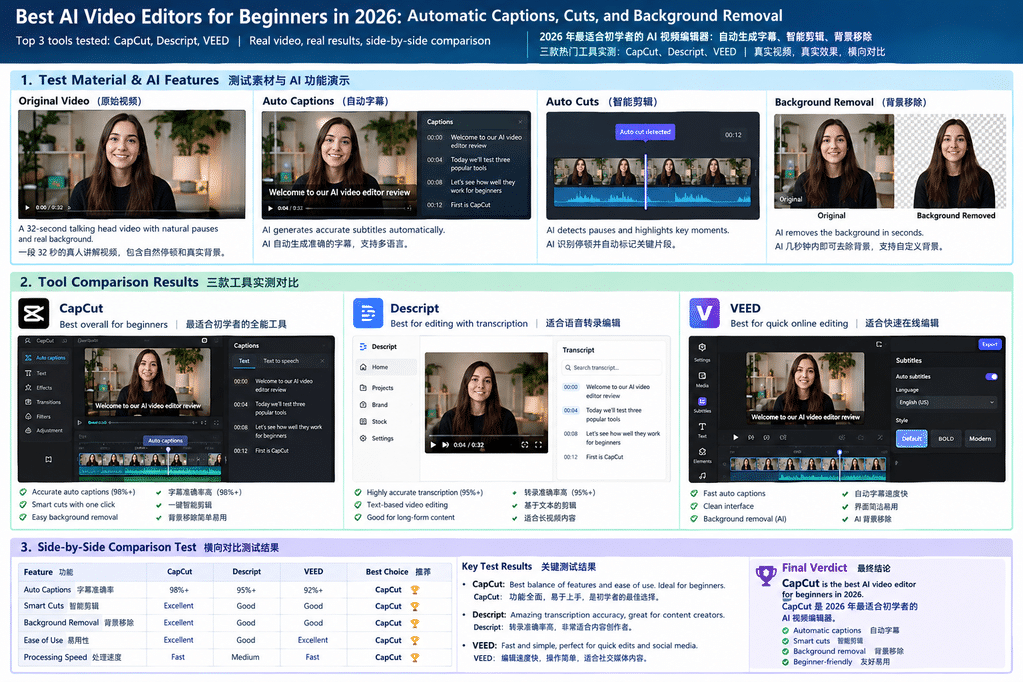
AI video editors can make it easier to create YouTube videos, software tutorials, product demonstrations, and short-form content. The most useful tools do more than add flashy effects: they help with repetitive work such as captioning, trimming pauses, and cleaning up a background.
AI 视频编辑器让制作 YouTube 视频、软件教程、产品演示和短视频变得更容易。真正有用的工具不只是添加炫酷特效,还能协助处理字幕、删除停顿和清理背景等重复性工作。
SEO title: Best AI Video Editors for Beginners in 2026
Meta description: Compare CapCut, Descript, and VEED for automatic captions, silence removal, and background removal. Practical advice for beginners choosing AI video editing software.
Focus keyword: best AI video editors for beginners
Related keywords: AI video editing software, automatic video captions, AI background remover, automatic video cutting, beginner video editing tools
But not every automated feature saves time in real projects. Captions can misrecognize technical terms, aggressive silence removal can make speech sound unnatural, and background removal may leave artifacts around hair or moving objects.
但并不是每项自动化功能都能在实际项目中节省时间。字幕可能识别错专业术语,过度删除停顿会让讲话显得不自然,背景移除也可能在发丝或运动物体周围留下瑕疵。
This guide looks at CapCut, Descript, and VEED from a practical perspective. The included images demonstrate subtitle presentation and background processing; they should not be interpreted as a measured ranking of these commercial products.
本文从实际使用角度分析 CapCut、Descript 和 VEED。文中的图片用于展示字幕呈现和背景处理方式,不应被理解为对这些商业软件进行过量化排名。
1. CapCut: A Practical Choice for Short Videos
CapCut is worth considering if you mainly create YouTube Shorts, social media clips, or short software tutorials. Its workflow combines timeline editing, text and caption tools, effects, and AI-assisted features.
如果你主要制作 YouTube Shorts、社交媒体短片或简短的软件教程,可以考虑 CapCut。它将时间轴编辑、文本与字幕工具、特效以及 AI 辅助功能整合在同一套工作流程中。
For a typical tutorial, import the footage, generate captions, review the transcript, remove unnecessary sections, and check the final export. The automatic output still needs a human review.
对于普通教程,可以先导入视频、生成字幕、检查转录文本、删除不必要的片段,最后检查导出效果。自动生成的内容仍然需要人工复核。
One detail that is easy to overlook is subtitle placement. A caption may be correct but still cover an important button or menu in a software tutorial. Check both placement and timing before publishing.
一个容易被忽略的问题是字幕位置。字幕即使内容正确,也可能遮挡软件教程中的重要按钮或菜单。发布之前,应检查字幕位置和出现时间。
Best for: Short-form videos and straightforward tutorials.
适合人群: 主要制作短视频和简单教程的新手。
Official website: capcut.com
2. Descript: Editing Spoken Videos Through Text
Descript uses a transcript-based editing workflow. Instead of relying entirely on a traditional timeline, creators can use the generated text to locate and edit parts of a recording.
Descript 采用基于转录文本的编辑方式。创作者不必完全依赖传统时间轴,也可以通过生成的文本定位并编辑录音中的特定部分。
This approach can be useful for interviews, online lessons, podcasts, and talking-head videos. However, removing every pause is rarely a good strategy. A short pause can give viewers time to understand a technical step or read an on-screen label.
这种方式适用于访谈、在线课程、播客和口播视频。不过,删除所有停顿通常不是理想的策略。短暂的停顿可以让观众理解技术步骤,或阅读屏幕上的标签。
Always listen to edited audio before exporting. Automatic editing should assist editorial judgment, not replace it.
导出之前,一定要重新听一遍编辑后的音频。自动剪辑应该辅助编辑判断,而不是完全取代人工判断。
Best for: Interviews, spoken content, and tutorials that need frequent text-based edits.
适合人群: 访谈、口播内容,以及需要频繁通过文本修改的视频教程。
Official website: descript.com/features
3. VEED: Convenient Browser-Based Editing
VEED is worth a look if you prefer editing in a browser rather than installing a desktop application. Its online workflow includes video editing and tools such as automatic subtitles and background removal.
如果你更喜欢直接在浏览器中编辑视频,而不是安装桌面软件,可以了解一下 VEED。它提供在线视频编辑功能,以及自动字幕和背景移除等工具。
Before choosing a paid plan, check export resolution, watermark rules, upload limits, processing restrictions, and the AI features included in the current subscription.
选择付费套餐之前,应查看导出分辨率、水印规则、上传限制、处理限制,以及当前订阅包含哪些 AI 功能。
Uploading large files can take time, particularly with high-resolution footage or long recordings, so your internet connection is also part of the workflow.
上传大型文件可能需要较长时间,尤其是高分辨率素材或长视频,因此网络连接也是工作流程中需要考虑的一部分。
Best for: Beginners who want to edit online with minimal setup.
适合人群: 希望无需复杂安装、直接在线编辑视频的新手。
Official website: veed.io/tools/video-editor
4. CapCut vs. Descript vs. VEED
The three tools approach editing differently. Choose according to your content format and how much manual editing you want to do, rather than assuming one product is best for everyone.
这三款工具的视频编辑思路并不相同。应根据内容形式和自己希望减少多少人工操作来选择,而不是认定某一款适合所有人。
| Feature | CapCut | Descript | VEED |
|---|---|---|---|
| Automatic captions | Available | Available | Available |
| Text-based editing | Workflow-dependent | Core workflow | Features vary |
| Silence / filler-word editing | Check current tools | Transcript-oriented workflow | Check current tools |
| Background removal | AI tools available | Workflow-dependent | AI background removal |
| Typical use case | Short-form videos | Spoken content | Online editing |
三款工具的常见功能与用途概览如下。具体功能可能随套餐、平台和地区变化,购买前请查看产品当前说明。
For short videos, CapCut is a sensible place to start. For transcript-driven spoken content, take a closer look at Descript. If you prefer browser-based editing, consider VEED.
对于短视频,可以从 CapCut 开始;对于依赖转录文本的口播内容,可以重点了解 Descript;如果你更喜欢浏览器编辑,可以考虑 VEED。
5. Automatic Captions: What Should You Check?
Automatic captions reduce the need to type every sentence manually, but speech recognition can struggle with accents, background noise, product names, abbreviations, and technical vocabulary.
自动字幕可以减少逐句手动输入的工作量,但语音识别可能难以准确处理口音、背景噪声、产品名称、缩写和专业术语。
A software tutorial might mention an API endpoint, a command-line flag, or a model name. A small transcription error can change the meaning or send viewers looking for the wrong setting.
软件教程可能会提到 API 端点、命令行参数或模型名称。一个细小的转录错误,就可能改变原意,甚至让观众找错设置位置。
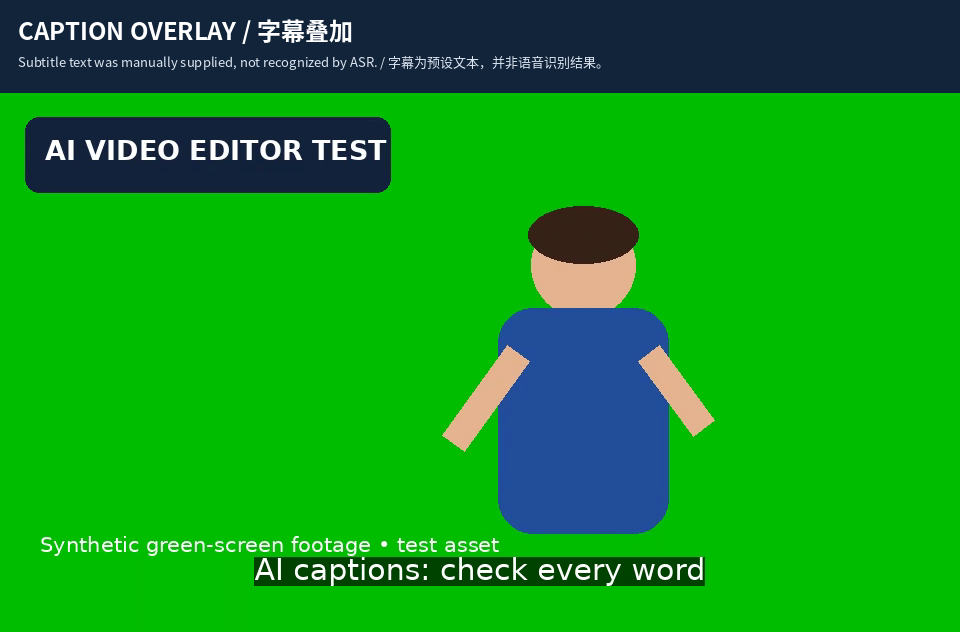
The caption text in this example was supplied manually to demonstrate the visual layout. To compare speech-recognition accuracy, use a real spoken clip and check the generated transcript against a verified reference.
本示例中的字幕文本由人工提供,用于展示视觉排版。若要比较语音识别准确率,应使用真实口播视频,并将生成的转录文本与核对过的标准文本进行比较。
A reliable review covers four areas:
可靠的字幕检查应涵盖以下四个方面:
- Accuracy: Are words, names, and technical terms correct?
- Timing: Do captions appear and disappear at the right moments?
- Readability: Are lines short enough to read comfortably?
- Placement: Do captions cover buttons, charts, faces, or other important details?
- 准确性: 单词、名称和专业术语是否正确?
- 时间: 字幕是否在正确的时刻出现和消失?
- 可读性: 每行文字是否足够简短,方便阅读?
- 位置: 字幕是否遮挡按钮、图表、人脸或其他重要内容?
6. Automatic Cuts: Is Removing Silence Always Better?
Silence detection can identify quiet intervals that may be candidates for removal. This is helpful when editing long recordings, but a quiet interval is not necessarily wasted time.
静音检测可以识别可能需要删除的安静片段。这在处理较长录音时很有帮助,但安静的片段并不一定是浪费时间。
In a tutorial, the presenter may pause while viewers read an interface or watch a progress indicator. Removing that pause could shorten the video while making the instructions harder to follow.
在教程中,讲解者可能会停下来,让观众阅读界面或观察进度指示器。删除这段停顿虽然能缩短视频,却也可能让操作过程更难理解。
FFmpeg includes audio filters that can detect silence using configurable thresholds and durations. This identifies candidate sections; it does not understand the video’s meaning or decide whether a pause is useful.
FFmpeg 提供了可根据阈值和持续时间检测静音的音频滤镜。这类工具能够找出候选片段,但无法理解视频内容,也不能判断某个停顿是否有用。
When assessing an automatic cutting workflow, record the detected pauses, duration removed, cuts that need to be reversed, and time spent correcting the result. Then replay every edit in context.
评估自动剪辑流程时,应记录检测到的停顿、删除的时长、需要撤销的剪辑,以及修正结果所花费的时间。之后还应结合上下文重新播放每个剪辑点。
7. Background Removal: Green Screen vs. AI
Background removal can help create a consistent look or place a presenter over slides and screen recordings. Results depend on the method and the source footage.
背景移除可以帮助统一视频风格,也能将讲解者放置在幻灯片或屏幕录制画面前。最终效果取决于处理方法和原始素材。
Chroma keying, often used with green screens, selects a background color and makes it transparent or replaces it. It works best when the background is evenly lit and the subject is clearly separated from it.
色键抠像常用于绿幕拍摄,它通过选择背景颜色,将其变为透明或替换成其他画面。当背景光线均匀、主体与背景区分明显时,效果通常更好。
AI background removal attempts to identify the foreground subject without requiring a perfectly uniform green background. It can still struggle with fine hair, transparent objects, motion blur, and clothing that resembles the background color.
AI 背景移除尝试在不依赖均匀绿幕的情况下识别前景主体。但面对细小发丝、透明物体、运动模糊,以及与背景颜色相近的衣物时,仍可能出现问题。
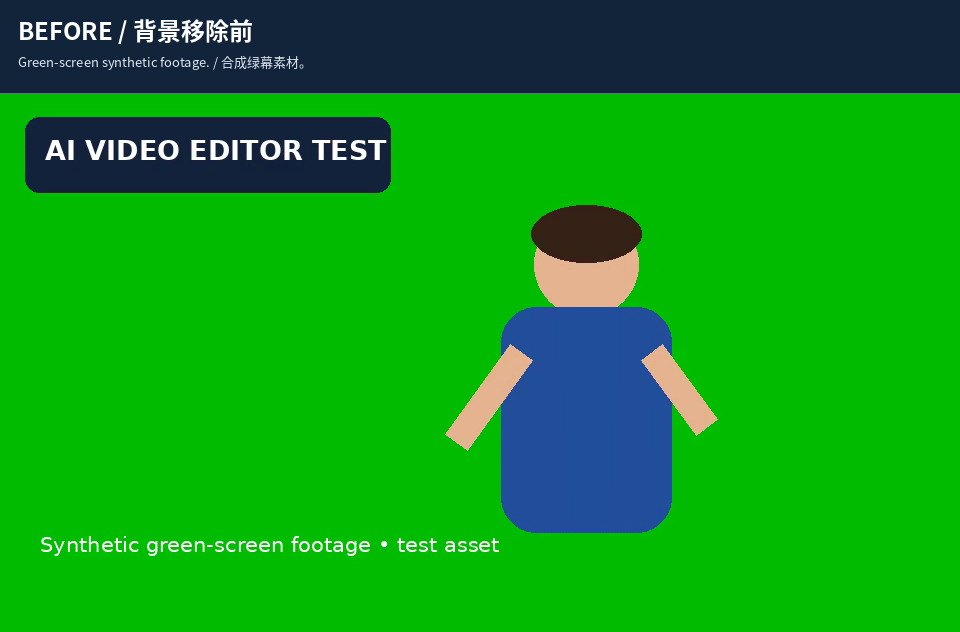
This before-and-after example illustrates a green-screen workflow, not a direct measurement of AI segmentation. For a fair comparison of AI tools, use the same real footage in each product and inspect moving edges—not just one still frame.
这组前后对比展示的是绿幕抠像流程,并非对 AI 分割性能的直接测量。若要公平比较 AI 工具,应在每款产品中使用相同的真实素材,并检查运动中的边缘,而不只是查看单张静态画面。
8. A Fair Testing Checklist
A useful comparison starts with the same footage, target language, and export settings. Otherwise, differences in source quality or configuration may affect the outcome.
有价值的对比应从相同的视频素材、目标语言和导出设置开始。否则,源素材质量或配置不同,都可能影响最终结果。
Choose a short clip containing clear speech, a technical term, a natural pause, and some movement. Then record the same measurements for every editor.
选择一段较短的视频,其中包含清晰的讲话、一个专业术语、一处自然停顿和一些运动画面。然后为每款编辑器记录相同的指标。
| Measurement | What to record |
|---|---|
| Caption errors | Incorrect, missing, and inserted words |
| Caption timing | Noticeable synchronization errors |
| Editing quality | Accidental cuts and awkward transitions |
| Background quality | Edge artifacts and missing subject details |
| Processing time | Time until the first export is ready |
| Correction time | Additional manual editing time |
| Export quality | Resolution, frame rate, and visible defects |
| 测量项目 | 记录内容 |
|---|---|
| 字幕错误 | 错词、漏词和插入词数量 |
| 字幕时间 | 明显的同步错误 |
| 剪辑质量 | 误剪和不自然的转场 |
| 背景质量 | 边缘瑕疵和主体细节丢失 |
| 处理时间 | 首次导出完成所需时间 |
| 修正时间 | 额外的人工编辑时间 |
| 导出质量 | 分辨率、帧率和可见缺陷 |
Avoid inventing scores before the measurements are collected. Recording what happened—including mistakes and correction time—makes the comparison more useful to other creators.
在收集实际数据之前,不要编造评分。记录真实情况,包括错误和修正时间,才能让对其他创作者有参考价值的比较更加可靠。
9. The Metric That Matters: Total Editing Time
The number of AI features matters less than the work required to produce a good final video. A useful way to evaluate efficiency is to measure the entire workflow, not just the automated step.
与 AI 功能数量相比,制作出高质量成片所需的工作量更加重要。评估效率时,应测量整个工作流程,而不仅仅是自动处理环节。
Total editing time = automated processing time + manual correction time + export and verification time.
总编辑时间 = 自动处理时间 + 人工修正时间 + 导出与检查时间。
A tool may generate captions quickly but make frequent errors in technical terms. Another may take longer but need fewer corrections. The second option can be more efficient overall, even if its initial processing time is higher.
某款工具可能生成字幕很快,却经常识别错专业术语;另一款工具处理时间稍长,但需要修改的地方更少。即使后者的初始处理时间更长,它在整个工作流程中也可能更高效。
The same principle applies to silence removal and background replacement. The best workflow reduces repetitive work without creating more problems to fix.
静音移除和背景替换也是如此。好的工作流程应减少重复劳动,而不是制造更多需要修正的问题。
10. Final Verdict
CapCut, Descript, and VEED each offer a different route to simpler video editing. CapCut is worth considering for short-form content, Descript for transcript-driven spoken videos, and VEED for browser-based editing.
CapCut、Descript 和 VEED 都提供了简化视频编辑的不同方式。CapCut 值得用于短视频制作,Descript 适合基于转录文本的口播视频,而 VEED 则适合浏览器编辑。
Before making a decision, consider the type of videos you produce, how much manual correction you can tolerate, the export quality you need, and the total cost of your workflow.
做出选择之前,应考虑自己制作的视频类型、可以接受的人工修正量、所需的导出质量,以及整个工作流程的总成本。
AI can handle repetitive tasks, but a good tutorial still depends on clear explanations, accurate information, sensible editing, and careful final review. Choose the tool that helps you produce those results consistently.
AI 可以处理重复性任务,但优秀的视频教程仍然离不开清晰的讲解、准确的信息、合理的剪辑和细致的最终检查。选择能够帮助你稳定实现这些目标的工具,才是最重要的。
Frequently Asked Questions
What is the best AI video editor for beginners in 2026?
There is no single best option for everyone. CapCut, Descript, and VEED are worth considering depending on your content format, budget, and preferred workflow.
2026 年最适合新手的 AI 视频编辑器是哪款?没有适用于所有人的唯一答案。CapCut、Descript 和 VEED 都值得考虑,具体取决于内容形式、预算和个人偏好的编辑流程。
Can AI automatically remove silence from videos?
Some editing tools offer silence-removal or automated editing features. Review every cut because pauses may help viewers follow a tutorial or understand a demonstration.
AI 能自动删除视频中的静音片段吗?部分编辑工具提供静音移除或自动剪辑功能。不过,每个剪辑点都应经过检查,因为停顿可能有助于观众跟上教程或理解演示内容。
Is AI background removal better than a green screen?
It depends on the footage. AI background removal can be convenient without a green screen, while chroma keying can work well with an evenly lit, consistent background.
AI 背景移除一定比绿幕抠像好吗?这取决于视频素材。没有绿幕时,AI 背景移除可能更方便;如果背景颜色统一且光线均匀,色键抠像也可以取得不错的效果。
Should I publish automatic captions without checking them?
No. Review technical terms, names, punctuation, timing, and line breaks before publishing. Small transcription errors can change the meaning of a tutorial.
自动字幕可以不检查就直接发布吗?不建议。发布之前,应检查专业术语、名称、标点、时间和换行。细小的转录错误也可能改变教程的含义。
References
Editorial note: Product features and plan limits can change. Check the official websites for the latest availability in your region.
编辑说明:产品功能和套餐限制可能发生变化,请以各官方网站在你所在地区的最新说明为准。