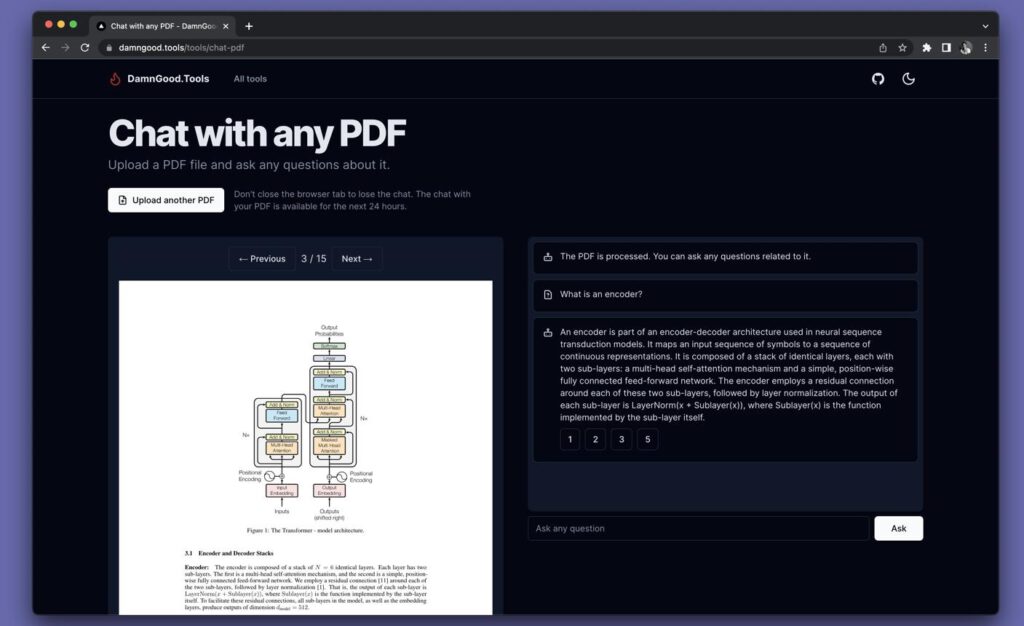
如何使用 AI 总结 PDF:分步实用指南


10
AI tools make it easier to turn long PDF documents into concise summaries, extract key findings, understand complex information, and save time. Whether you are reading research papers, business reports, technical manuals, or e-books, you can use AI to process information more efficiently.
AI 工具可以帮助你将冗长的 PDF 文档转化为简洁的摘要,提取关键结论,理解复杂信息,并节省阅读时间。无论你阅读的是学术论文、商业报告、技术手册还是电子书,都可以利用 AI 更高效地处理信息。
This guide explains how to summarize a PDF step by step, which tools to use, how to write effective prompts, and how to improve the accuracy of AI-generated summaries.
本指南将详细介绍如何逐步总结 PDF、选择合适的 AI 工具、编写有效的提示词,以及提高 AI 摘要的准确性。
1. Choose an AI Tool for PDF Summarization
1. 选择适合总结 PDF 的 AI 工具
Different AI tools are suitable for different document types and workflows.
不同的 AI 工具适用于不同类型的文档和使用场景。

ChatGPT
Best for: General-purpose PDF summaries, question answering, extracting key points, and rewriting technical content in plain English.
适合场景: 通用 PDF 总结、文档问答、提取重点,以及将技术内容改写成通俗易懂的英文。
Website / 官网: https://chatgpt.com/

Google NotebookLM
Best for: Research papers, study materials, and answering questions grounded in uploaded sources.
适合场景: 学术论文、学习资料,以及基于上传资料进行问答。
Website / 官网: https://notebooklm.google.com/

Claude
Best for: Long documents, detailed analysis, and summaries that preserve context and nuance.
适合场景: 长篇文档、深度分析,以及需要保留上下文和细节的摘要。
Website / 官网: https://claude.ai/
Note: File size limits, supported formats, and usage allowances vary by tool and subscription. Check the current limits before uploading large PDFs.
注意:不同工具及订阅方案的文件大小限制、支持格式和使用额度可能不同。上传大型 PDF 前,请先确认当前限制。
2. Upload Your PDF
2. 上传 PDF 文件


8
Follow these steps:
- Open your preferred AI tool.
- Start a new conversation or create a new research notebook.
- Click the attachment or upload button.
- Select your PDF file.
- Wait for the tool to process the document.
操作步骤如下:
- 打开你选择的 AI 工具。
- 新建对话或创建研究笔记本。
- 点击附件或上传按钮。
- 选择需要总结的 PDF 文件。
- 等待 AI 完成文档处理。
Before uploading, check the document type. Text-based PDFs are generally easier to process. Scanned PDFs may require OCR (optical character recognition) to convert images of text into machine-readable content.
上传前请检查文档类型。 含有可选择文本的 PDF 通常更容易处理。扫描版 PDF 可能需要 OCR(光学字符识别)技术,将文字图片转换为机器可读取的文本。
For confidential documents, review the AI provider’s privacy and data-retention settings before uploading.
对于包含机密信息的文档,上传前应检查 AI 服务商的隐私政策和数据保留设置。
3. Write an Effective AI Prompt
3. 编写有效的 AI 提示词
Uploading a PDF is only the beginning. The quality of your summary depends heavily on how you instruct the AI.
上传 PDF 只是第一步。摘要的质量在很大程度上取决于你如何向 AI 提出要求。
Here is a reusable prompt you can copy and paste.
下面是一段可以直接复制使用的通用提示词。
PDF Summary Prompt / PDF 总结提示词
Copy Prompt
English prompt
Summarize the uploaded PDF in clear, concise English. Include: 1. A 3-sentence executive summary. 2. The five most important points. 3. Key facts, statistics, and conclusions. 4. Important terminology with simple definitions. 5. Actionable recommendations or next steps, if applicable. 6. Any limitations, assumptions, or unanswered questions. Organize the response with headings and bullet points. Reference page numbers for important claims when possible. Do not invent facts. If information is missing or unclear, state that explicitly.
中文提示词
请用清晰、简洁的中文总结上传的 PDF 文档。请包含:三句话的执行摘要、五个最重要的观点、关键事实与统计数据、重要术语及其通俗解释、可执行的建议或后续步骤,以及文档中的局限性、假设和未解决的问题。请使用标题和项目符号组织内容,并尽可能标注重要结论对应的页码。不要编造事实;如果信息缺失或不明确,请明确指出。复制中文提示词
Why does this prompt work?
为什么这个提示词有效?
- Clear structure / 结构清晰: It tells the AI exactly what to include.
- Focus on key information / 聚焦重点: It prioritizes the main findings rather than minor details.
- Accuracy requirements / 准确性要求: It discourages invented facts and encourages transparency.
- Verifiable references / 可验证的引用: Page numbers make it easier to check important claims.
4. Generate Different Types of Summaries
4. 生成不同类型的摘要
Not every PDF needs the same summary. Choose the format according to your goal.
不同的 PDF 文档需要不同的总结方式。你可以根据自己的目标选择摘要类型。
Summary format / 摘要类型Executive summary / 执行摘要Key points / 核心要点Study notes / 学习笔记Detailed chapter summary / 逐章总结Critical analysis / 批判性分析
Output language / 输出语言English only / 仅英文中文Bilingual / 中英双语
Copy customized prompt / 复制定制提示词
Examples of when to use each format:
- Executive summary: quickly understand a business report.
- Key points: review a long article in a few minutes.
- Study notes: prepare for exams or presentations.
- Chapter-by-chapter summary: understand a book or manual systematically.
- Critical analysis: evaluate the author’s arguments, evidence, and limitations.
不同类型的摘要适用场景如下:
- 执行摘要:快速了解商业报告。
- 核心要点:在几分钟内掌握长篇文章的重点。
- 学习笔记:备考或准备演示文稿。
- 逐章总结:系统理解书籍或技术手册。
- 批判性分析:评估作者的论点、证据和局限性。
5. Ask Follow-Up Questions
5. 继续提问,深入理解文档
One of the biggest advantages of AI is that you can ask questions after generating the initial summary.
AI 的一大优势是,你可以在生成初步摘要后继续提问。
Try these examples:
你可以尝试以下问题:
| English prompt | 中文提示词 |
|---|---|
| What are the three most important conclusions? | 最重要的三个结论是什么? |
| Explain this document as if I were a beginner. | 请用初学者能够理解的方式解释这份文档。 |
| What evidence supports the author’s main argument? | 哪些证据支持作者的主要论点? |
| List all important statistics and their page numbers. | 列出所有重要统计数据及其所在页码。 |
| What information is missing from this report? | 这份报告还缺少哪些重要信息? |
| Create 10 quiz questions based on the PDF. | 根据这份 PDF 创建 10 道测验题。 |
Pro tip: Ask the AI to identify the relevant page numbers and quote short passages when possible. Then check the original document to confirm that the answer reflects the source accurately.
实用技巧: 尽量要求 AI 标注相关页码,并在适当情况下引用简短原文。随后检查原始文档,确认答案是否准确反映了原文内容。
6. Verify the Summary for Accuracy
6. 检查摘要的准确性
AI summaries can contain errors, omit important details, or misunderstand charts and tables. Always verify critical information before relying on the results.
AI 摘要可能出现错误、遗漏重要细节,或误解图表和表格。在依赖总结结果之前,务必核实关键信息。
Use this checklist:
使用以下检查清单:
Accuracy checklist / 准确性检查清单
0/5Confirm names, dates, figures, and statistics against the original PDF.Check important claims against the cited pages.Review charts, tables, footnotes, and appendices separately.Make sure the summary preserves the author’s original meaning.Identify missing context, uncertainty, and conflicting evidence.
For academic, legal, medical, or financial documents, use AI as a reading assistant rather than a substitute for professional judgment or the original source.
对于学术、法律、医疗或金融文档,应将 AI 视为阅读辅助工具,而不是专业判断或原始资料的替代品。
7. Handle Long or Scanned PDFs
7. 处理超长或扫描版 PDF
Some documents require a different workflow.
某些文档需要采用不同的处理流程。
For long PDFs / 对于超长 PDF:
- Ask the AI to create a document outline.
- Summarize each chapter or section separately.
- Combine the section summaries into one overall summary.
- Ask the AI to check for contradictions or missing topics.
- 先让 AI 生成文档目录和结构概览。
- 分别总结每一章或每个章节。
- 将各部分摘要整合成一份完整总结。
- 让 AI 检查内容之间是否存在矛盾或遗漏。
For scanned PDFs / 对于扫描版 PDF:
- Run OCR if the text is not selectable.
- Check whether the extracted text contains recognition errors.
- Pay special attention to tables, mathematical formulas, and diagrams.
- Upload the processed document and repeat the summarization workflow.
- 如果文本无法选择,先执行 OCR。
- 检查提取的文字是否存在识别错误。
- 特别检查表格、数学公式和示意图。
- 上传处理后的文档,再执行总结流程。
If the PDF contains many images or complex diagrams, ask the AI to analyze those elements separately instead of relying only on extracted text.
如果 PDF 包含大量图片或复杂图表,可以要求 AI 单独分析这些内容,而不是仅依赖提取出的文本。
8. Common Mistakes to Avoid
8. 常见错误及避免方法
| Mistake / 常见错误 | Better approach / 改进方法 |
|---|---|
| Asking only “Summarize this PDF.” / 只说“总结这份 PDF”。 | Specify the audience, purpose, length, and output format. / 明确受众、目标、长度和格式。 |
| Trusting every AI-generated claim. / 完全相信 AI 的每个结论。 | Verify important facts against the source. / 对照原文核实重要事实。 |
| Summarizing everything in one pass. / 一次性总结所有内容。 | Break long documents into sections. / 将长文档拆分为多个部分。 |
| Ignoring tables and charts. / 忽略表格和图表。 | Review visual information separately. / 单独检查视觉信息。 |
| Uploading sensitive information without checking privacy. / 未检查隐私就上传敏感资料。 | Review data policies and remove unnecessary sensitive information. / 检查数据政策并删除不必要的敏感信息。 |
Conclusion: The Best Way to Summarize a PDF with AI
总结:使用 AI 总结 PDF 的最佳方法
The most effective workflow is simple:
最有效的工作流程其实很简单:
1. Upload the PDF / 上传 PDF
Choose a tool that supports your document and file size.
选择支持该文档类型和文件大小的 AI 工具。
2. Give clear instructions / 提供明确指令
Specify key points, facts, structure, and language.
指定重点、事实、结构和输出语言。
3. Refine the summary / 优化摘要
Ask follow-up questions and request more detail where needed.
通过追问补充细节,完善摘要。
4. Verify important details / 核实重要细节
Check key claims against the original PDF.
对照原始 PDF 检查关键结论。
For most everyday tasks, start with ChatGPT or NotebookLM, use a structured prompt, and verify important claims. This combination offers a practical balance of speed, clarity, and reliability.
对于大多数日常任务,可以从 ChatGPT 或 NotebookLM 开始,使用结构化提示词,并核实重要结论。这种方法能够兼顾效率、清晰度与可靠性。
Ready to try it? / 现在就试试吧!
Upload your PDF in ChatGPT and paste the prompt from Section 3. You can also upload a PDF directly in this conversation, and I can help summarize it in English, Chinese, or both.
你可以在 ChatGPT 中上传 PDF,并粘贴第 3 节的提示词。也可以直接在当前对话中上传 PDF,我可以帮助你生成英文、中文或中英双语摘要。
